December 17, 2006

The Simplest, Most Effective SEO Move You Can Make 198

Yo! Have you checked out the Thesis Theme yet? I’d love to explain how optimized, detailed, and easily-customizable Thesis is, but honestly, I know that you’re going to benefit the most from the amazing community of theme users. Smart people offering up tailored solutions to common theme problems? Now that’s serious value.

There are tons of bullet point items on the proverbial SEO list, but one item in particular stands head and shoulders above the rest in terms of its overall effectiveness.

This key SEO component is so powerful because it serves both search engines and people. Oftentimes, we become so involved in site building details that we lose sight of the ultimate truth here—search engines, without people, are basically useless.

So, how can you give the search engines killer juice and provide something captivating for the end user at the same time?

By constructing dynamic, descriptive <title> tags for each page of your site.

Dynamic? For each page? Sounds complicated.

My friends, this is precisely why you read my site :) It’s easy, and I’m literally giving away the solution for all you WordPress users out there.

How and Why Dynamic Titles Work
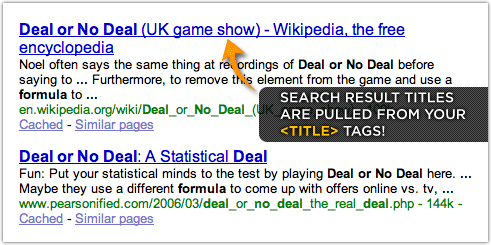
Search engine result titles are pulled from your title tags

When Google, Yahoo!, and other engines cull search results, they return a title with a brief description of the linked page, as seen above. These SERPs, as they’re called, are extremely scannable, and the user’s attention is immediately drawn to the titles because they are bold, blue, and clearly distinct from the rest of the page. As you might have guessed, the titles are constructed from the actual <title> tags on the pages of your site.

Ideally, the contents of your <title> tags would not only change with every page, but they would also be indicative of the information contained on that particular page. On top of that, you would certainly want your titles to appeal to humans, because ultimately, if the title they see in the SERPs doesn’t appeal to them, they’re not going to click on it!

It’s Time to Put Dynamic Titles on Your Site

In practice, however, actually taking the time to modify every page’s titles would be a heck of a lot of work. In cases like this, dynamic content generation is absolutely the preferred solution.

Fortunately, WordPress enables you to do this with ease, and believe it or not, this is one of those rare instances where a “one size fits all” solution really works!

All you have to do is add the following line of PHP between the <title> tags in your theme’s header.php file.

<?php if (is_single() || is_page() || is_archive()) { wp_title('',true); } else { bloginfo('description'); } ?> &#8212; <?php bloginfo('name'); } ?>

Grab the code above, or simply copy and paste it from this text file into your header.php file.

The End Result

Once you’ve made the changes to your header.php file, you’ll be in business with a completely dynamic titling structure that is guaranteed to serve you well in Google, Yahoo!, MSN, or the search engine mashup of the moment.

Also, I constructed the PHP so that on the home page of your site, the title will be the name of your site with the associated tagline from your WordPress administration panel. You can enter both of these values under the Options tab, and you’ll need to do that in order to take full advantage of this handy snippet of code.

Write Post in the WordPress administration panelOther than that, the title tags across the rest of your site will be based on the value that you enter into the Title field in the Write Post or Write Page sections of your WordPress administration panel.

At this point, I can see the wheels in your head turning, and for good reason! When your <title> tags are constructed this way, you can exercise precise control over what information searchers will see.

This is powerful stuff.

Now, the only thing separating you from traffic, fame, and fortune is your ability to construct compelling headlines. Luckily, I happen to know a guy who’s more than happy to help you out on that front :)

SEO for EverybodyThis is the third in a series of posts covering SEO “best practices” called SEO for Everybody.

There are lots of simple tweaks that average, everyday users can make to their Web sites that will drastically improve both overall accessibility and search engine performance. The goal of SEO for Everybody is to help guide those users through these basic processes, thus resulting in a more accessible, utopian universe.

Or something like that :)

198 Comments ↓

#David Krug  at 4:53 pm on Dec 17, 2006

Oh crap does this come preinstalled on cutline, or am i just that lazy? that i can’t do this simple step.

#Mike  at 5:04 pm on Dec 17, 2006

What line of PHP ?

Did you hide it like some long sought after Christams gift that was hidden and forgotten about ?

Am I overlooking it ?

Is the Loch Ness monster real ?

#Joe  at 5:07 pm on Dec 17, 2006

I’m getting an error when putting the code between the tags:

Parse error: syntax error, unexpected T_STRING

#Chris P.  at 6:13 pm on Dec 17, 2006

David — Cutline comes with essentially the same markup structure for <title> tags. The only difference is that each individual page is also “branded” with the name of the site, as it appears after the title.

I’ve had one person suggest that this may cause Google to suspect that you have duplicate content, but I have found no evidence to support that claim.

On top of that, I like branded search results, because if you’re tracking the performance of your site in the SERPs, it’s easy to spot your own results.

Mike — Are you using IE 7? Gimme a break. After you get FireFox, I’ll apologize for having that render improperly on sub-standard browsers. For some reason, my <pre> tags were misbehavin’, so I had to remove em.

Joe — The problem with the code was a character encoding issue. To fix this, I created a text file that you can copy and paste in order to get the desired results. Thanks for alerting me to the issue, and I’m sorry I didn’t do a better job of testing it up front!

#David Krug  at 6:27 pm on Dec 17, 2006

Thanks dudeski. :)

#Mike  at 7:15 pm on Dec 17, 2006

Uh, yes I was using IE7, but I have FF too and didn’t think to check it.

Seems silly to use a browser that can’t beat IE for number of users. If you can’t beat it, bow down to it.

I alternate between the two, to check our sites and make sure they look good in both.

Thanks for the file !

Wait a sec … sub-standard ? IE7 Rules ! Just like Bill Gates ! Bwaaaahhhhhaaaa ! ( That’s evil laughter )

#Gregory Pittman  at 7:39 pm on Dec 17, 2006

Chris, If we’re using the Optimal Title plugin, does this line of code provide any additional benefit over the plugin? Obviously we wouldn’t need to use both simultaneously.

One benefit I see is that your method doesn’t require a plugin, which may appeal to thsoe who have concerns about running too many. I don’t think I’m running too many, but I don’t want to run one if I don’t have to.

#Mike  at 7:45 pm on Dec 17, 2006

Ooooh, good thinking Gregory. I use that on several blogs and had forgotten about it.

What about it O’ Mighty Brain ?

#Chris P.  at 7:53 pm on Dec 17, 2006

Gregory,

I didn’t know about the plugin’s existence prior to writing this post, and to be honest, it never occurred to me that there might be one.

I dunno, but it seems to me that one line of PHP is too simple for an entire plugin.

Aside from all that, there really is no difference from the plugin, except that your titles will be “branded” if you implement the plugin the way the author suggests it.

And as I said earlier, I don’t think that’s such a bad thing.

#Gregory Pittman  at 10:12 pm on Dec 17, 2006

Okay, that helps sort things out. I have tweaked the tag you posted above to include the blog brand, and have disabled the plugin. One less I have to worry about. Thanks, Chris!

#shawn blanc  at 12:57 am on Dec 18, 2006

Chris - Your SEO for everybody series is excellent. Thanks so much for putting it together. Even though I already use the dynamic title plugin, it feels good to read again how helpful it is.

#Robert  at 11:52 am on Dec 18, 2006

I wish Matt Yglesias would do that on his site.

Aside fro S.E.O., the technique is also helpful for people who have many browsers or browser tabs open at once. The tag contents also appear as the title of a borwser window, of course. And I believe it also helps those using assistive technology, such as screen readers.

#adam  at 1:35 pm on Dec 18, 2006

personally, i hate the way wordpress handles titles, in that it uses that stupid right angle quote character that was cool 2 years ago.

i much prefer hacking the title by hand, so that you get proper titles that don’t have unencoded characters show up in SERP’s.

fauna has a good example of this
see line 7

#Chris P.  at 1:40 pm on Dec 18, 2006

Adam,

This code is a complete aberration from the way WordPress handles titles by default.

Also, by using the code provided here, you get automatic character encoding because the title passes through the WordPress “scrubber” before being placed into the XHTML.

My code literally takes care of every grievance you just mentioned.

#Martial Development  at 3:28 am on Dec 19, 2006

It seems great minds think alike :) This was one of the first changes I made from Cutline to Ninja Scroll.

#Chris P.  at 9:39 am on Dec 19, 2006

Martial Development,

Cutline already comes equipped with a killer <title> structure.

What on earth are you talking about?

#Martial Development  at 1:57 am on Dec 20, 2006

Cutline 1.03 does not include the blog description in the front page title. Correct?

#Chris P.  at 9:16 am on Dec 20, 2006

No, the blog description isn’t on the main page. It helps if you specify that, of course, and as far as SERPs go, your home page is small potatoes.

So far this month, my home page has “landed” 0.4% of all of my inbound searches.

If you’re looking to make rapid site improvements, then focusing on having your internal pages rank for their respective topics is the way to go.

I certainly recommend using the description in your home page titles, though, simply because over time, that may be a decisive factor in ranking for a hugely competitive term. To illustrate, I’d point you towards Copyblogger and the term “copywriting.”

#Edwin  at 1:26 pm on Dec 20, 2006

Call me crazy, but some time ago i had pages in the supplemental index and when i changed my title structure to the one you have, i got out. It might have been coincidents, who knows.

#David Bradley Science Writer  at 7:26 am on Dec 21, 2006

Excellent mod! I was using a hybrid dynamic titling approach before because I never thought to use a conditional clause. Now the blog homepage has a descriptive title and all posts have their own proper standalone titles linked to the post slog keywords!

Thanks

db

#Emil  at 1:10 pm on Jan 1, 2007

Chris,

Have you ever considered making a BBPress theme for Cutline users? There are not a lot of themes for BBPress and I think if done it would be widly used once BBPress 1.0 is released on Jan 15 and BBPress spreads like WordPress.

Anyways think about it, it probably wouldn’t be to hard and is a good investment of time.

Thanks,
Emil

#Dean  at 9:55 am on Jan 3, 2007

These are the kind of tips I like. All done in less than 2 minutes. Thanks for sharing these :-)

#Feeling Sandboxed? How You Can Get 53% More Searches with One Tweak  at 4:48 pm on Jan 4, 2007

[...] If you’re serious about improving your SEO, then you’ve probably already taken the time to generate a sitemap and construct dynamic, descriptive <title> tags. [...]

#organizeher  at 8:17 am on Jan 5, 2007

Not being smart, I didn’t research my URL before I began my site. I have spent 3 months trying to get Google to index organizeher.com b/c apparently the previous owner was a Google Adsense spammer and was dropped from the index.

When I implemented Cutline and cleaned everything else, I made a request to Google, re-submitted and voila! We are live.

I give credit to Cutline’s smart/savvyness in my sidebar - thanks for such a great theme! I’m using it EVERYWHERE!

Yeeee-haaaa!

#Chris P.  at 8:45 am on Jan 5, 2007

OrganizeHer,

I think I need to start one of those infomercials about SEO success stories.

I’ve learned a lot about the topic since I launched the Cutline theme, and to be honest, it’s been a stroke of good fortune to see people’s sites perform so well with my theme.

Honestly, I think the bottom line is that semantic markup and a few simple SEO principles really go a long way. The truth is, so few people do things the “right” way, so those who do see pretty significant benefits.

Best of luck with OrganizeHer; your design is the killerest.

#Matt  at 7:41 pm on Jan 11, 2007

I am not follow you on this one. Will it affect my current rankings negatively? I made the change and I am wondering what type or results it will have. Sorry if it is a thick-skulled question!

Matt

#Chris P.  at 7:39 am on Jan 12, 2007

Matt,

Things may get thrown out of balance temporarily, but overall, this can do nothing but help your rankings. In fact, it will definitely affect your rankings positively, but the real benefit will come in the form of clicks in the SERPs.

After all, you click on attractive headlines that are related to what you’re searching for, right?

#organizeher  at 9:26 am on Jan 17, 2007

Chris, thank you kindly for the design compliments. I tried to keep it simple, but … well, female. :)

Matt, the theme itself won’t effect your current ranking negatively. As Chris said, you may notice a shift change when you get crawled again, but if anything you’ll be bolstered a bit as long as your content and additional code is clean.

Make sure to download and put into play the XHTML Sitemap.

There are tons of SEO elements that Chris has touched on. Another favorite of mine would be Aaron Wall over at SEO Book.

Chris, I’d love for you to do an entry on your take on the usefulness/purpose behind tags -v- categories. Misuse. Use. Whatever. I caught a snippet of that in another comment you made to someone and it jives with me about how people are organizing their blog content.

#mark  at 10:12 am on Jan 17, 2007

Chris, it’s a good write-up. But, I prefer some different code than you do.

Your check for is_single(), is_page(), is_archive() is almost pointless, because that’s got to be 99% of all pages in WordPress. In addition, most peoples blog name is not something that helps in SERPs.

I think you would be better served to do a check for is_home() and if so then give a keyword loaded title and if not home then use title();

That’s what I use for my blog Search-This and it works great. I have included the code here for your viewers: http://www.search-this.com/title.txt

#organizeher  at 11:10 pm on Jan 17, 2007

I’ll check back then. :)

#Chris P.  at 12:58 am on Jan 18, 2007

Organizeher,

Pretty astute observation there on tags vs. categories. Although my post would likely only echo my opinion on the matter, I absolutely believe that people have royally screwed up the way these things are used.

Problem is, it’s not really their fault! They weren’t presented with alternatives up front, and I learned quite a bit about Web architecture before I realized how potentially limiting it can be to “tag” with categories.

I’m running out of simple SEO tips, so maybe I’ll go that route in my next entry.

#Phil Van Treuren  at 8:20 am on Jan 21, 2007

Hey Chris, can you suggest how to do this for Typepad users who implement Advanced Templates? I would love to be able to do this for my Typepad blog.

Love your blog, bookmarked it

#Chris P.  at 10:49 am on Jan 21, 2007

Phil,

It’s been a while since I’ve used MovableType or TypePad, but I think the data structures are the same for both. If that’s true, then try placing the following between the <title> tags in your Individual Archive Template:

<$MTEntryTitle$>

This will dynamically place the title of your entry in the title field on each and every post page.

#Phil Van Treuren  at 1:42 pm on Jan 21, 2007

Hey Chris! It took me a while of trial and error, but I figured out how to set up dynamic page titles for TypePad blogs. I posted on it and I hope you’ll check it out and let your readers know how to do it. Thanks for the inspiration!

#How to create dynamic title tags for TypePad blog pages  at 4:28 pm on Jan 25, 2007

[...] I was researching ways to implement SEO for The Wal-Mart Files to increase my search engine hits when I came across a great post on creating dynamic title tags by Chris Pearson at Pearsonified. I’ll let you read Chris’s post yourself, but in a nutshell he tells us that creating dynamic title tags for your individual blog pages–that is, title tags that only show the keyword-rich title you wrote for your individual post–is “the simplest, most effective SEO move you can make.” [...]

#Adam Moro :: Blog » Dynamic Meta Tags  at 4:33 pm on Jan 25, 2007

[...] Using the WordPress Template Tags as a guide, you can pick and choose which pieces of data you want displayed in the Meta tags. Below are the Meta tags I’m using on this blog. I’ve included the Title tag in the example because honestly, using dynamic Title tags is said to be the the “simplest, most effective SEO move you can make” (to optimize your WordPress). [...]

#Rob O.  at 1:21 pm on Jan 27, 2007

Ooops, I got mixed up and posted this question elsewhere…

I’m using Blogger and it generates each page off of a base template so every blog post page bears the same title. Any suggestions about getting around this? There are other pages within my site, of course, and I do use unique and meaningful titles on those.

#..::| archGFX | Disconnected 1.2 |::..  at 3:11 pm on Jan 27, 2007

[...] added chris pearson’s SEO friendly titles [...]

#Rod  at 6:50 pm on Feb 2, 2007

Hi I added the tag to the header like you so nicely wrote. Now I have in the browser bar the name of the site 2x.. or if I am in a page the name of the page 2x… have I misread your instructions?..

Thanks Rod :-)

#Rod  at 10:27 pm on Feb 3, 2007

I figured it out… I’m learning PHP so I do misunderstand sometimes.

#SEO Magic With*Dynamic* Title Tags - Marketing Treasure Hunt  at 10:34 am on Feb 4, 2007

[...] The Simplest Most Effective SEO Move You can make Share and Enjoy:These icons link to social bookmarking sites where readers can share and discover new web pages. [...]

#Roland  at 2:58 pm on Feb 8, 2007

A bit old seo trick, but without any doubt super super efective :)
Good article.

#RubySquad  at 12:49 pm on Feb 14, 2007

The Simplest, Most Effective SEO Move You Can Make

Where ever I put it, it keeps showing up at the top of my posts onscreen. Shouldn’t it be invisible?

Chris, can you help with this question?…

#Marty Weintraub  at 9:15 am on Feb 15, 2007

I would like to discuss hiring you to develop some blogs for corporate clients. Rand Fishkin recomended you. Please call.

Marty Weintraub
218-310-2244

#Brenda  at 11:30 pm on Feb 17, 2007

Thank you, Chris, for creating such a great theme. I feel very lucky to have chosen Cutline. It was simply the best looking theme available. I had no idea how important all your work was behind the visual design. All of your SEO tips have worked for me. I began my site in November and it finds it’s way into the first 10 to 20 google listings with the most general of search strings in a very crowded market. Your intelligence and generosity are remarkable.
Thank you!

#Fran6  at 2:40 am on Feb 21, 2007

Hi Chris,

Do you think that tip is still useful pour k2 themes ? I mean, I have already a lot of people coming from the search engines and the title given by k2 is “titleofthepost at yourblognama”. I think it is relevant. But, for the homepage, it just gives the blog name… So, should I only change the title for the homepage ? And I am also afraid to be sandboxed Google or to have a lower PR… What do you think ?
Thanks again !!

#Fran6  at 11:28 pm on Feb 21, 2007

Hi it’s me again. I am really surprised that nobody talked about http://www.netconcepts.com/seo-title-tag-plugin/
That is a perfect plugin for title management no ? adn easier for beginners… What do you think Chris ?

#Chris P.  at 7:44 am on Feb 22, 2007

Fran — Absolutely not. The plugin to which you referred requires users to edit the header.php file, just like my suggestion from the post.

Then, the plugin requires an additional degree of difficulty in the use of custom fields within the WordPress posting area.

My method, however, will optimize every page of your site immediately upon implementation. No custom fields, no extra garbage — just instant results.

#Fran6  at 8:11 am on Feb 22, 2007

Hi Chris, thanks for your reply ! And what do you think about the consequences with Google in the short term ? I am afraid to change my titles and to lose Pagerank or having trouble with Google in the first weeks… Your opinion ?

#Chris P.  at 8:14 am on Feb 22, 2007

Fran — Changing your post titles to a better structure is something that should be done immediately. The next time Google indexes your site, you will probably see positive results in the SERPs.

#Référencement Wordpress | Optimiser vos titres de pages pour une meilleure visibilité sur le web  at 2:27 am on Feb 23, 2007

[...] Il y a quelques jours, je suis tombé sur cet article très intéressant en soi qui propose de modifier le format des titres des pages de vos blog. En effet, comme on en a déjà parlé précédemment, les titres ont une grande importance pour un bon référencement, et selon le thème que vous avez, le traîtement par la balise est différent. La balise c’est elle qui va, par exemple, interprêter le titre de votre article et le retranscrire selon un certain format dans le code source de votre page et qui sera visible dans l’entête de la fenêtre du navigateur et sur les moteurs de recherche. Il est donc important que cette balise soit optimisée et claire pour être visible sur Google par exemple. [...]

#Rian  at 6:52 am on Mar 2, 2007

Chris,
Not sure if you’ve heard of this SEO technique or not, and I havent verified that it works. I did learn from a guy who builds sites with XSitePro that he renames his CSS sheets to a primary keyword for the site. He claims he gets organic listings without getting lots of backlinks. Do you think this really works or have you ever heard of this technique?

#Chris P.  at 11:41 am on Mar 2, 2007

Rian — Bologna? Aisle 6.

There’s no way this has anything to do with rankings.

Backlinks, content, and a well-constructed site are the three “magic bullets” of SEO, and anyone who tries to sell you on an “amazing technique” that doesn’t involve any of the three is almost certainly full of it.

#SEO with WordPress for beginners  at 3:02 pm on Mar 24, 2007

[...] If every single page on your site has the same title then you’re making a huge mistake. Seriously. Huge. Chris Pearson wrote a great article that explains how to use WordPress code to make your titles change dynamically depending on which page your on. This will help tremendously with indexing and also getting people to actually click through to your site when it shows up in the search results. [...]

#Babak  at 3:44 am on Apr 12, 2007

Chris, I’m not sure I understand how SEO Title Tag plugin is inferior to this. I’m using it and it gives me tremendous flexiblity. I can customize my title tags on the fly as well as specific URLs, do it in batches, re-title my categories, pages, etc… all customizable.
So please fill this n00b in on why your suggestion/plugin is superior. Thanks

#Chris P.  at 8:39 am on Apr 12, 2007

Babak — The SEO Title Tag plugin requires you to edit individual posts and pages to change the <title> tags. If you’re comfortable with that, then the plugin actually provides you with more flexibility than the method I’ve described here.

However, for 99.9% of folks, simply implementing an optimized version of title tags ought to help by leaps and bounds in the search engines.

Again, though, if you’re comfortable with the plugin, then by all means, use it!

#David  at 4:17 pm on Apr 12, 2007

This was AWESOME and so easy to implement. I tried using the All-in-One SEO pack for WP that does the same thing (and more), but it broke the search function. This hit the spot and didn’t even require a plugin (or more than 1 min of work).

Thanks so much!
David
http://www.techdeals.net/

#Wauks  at 7:13 pm on Apr 12, 2007

This was definitely a good read. Thanks for the tips man!

#Cómo Mejorar el Tráfico de un Blog en un Solo Paso  at 2:05 am on Apr 13, 2007

[...] Acá les dejo también el post completo de Chris, en el que da este consejo: The Simplest, Most Effective SEO Move You Can Make . [...]

#Blog template factor in SEO  at 12:39 pm on Apr 13, 2007

[...] Dynamic page titles display. Chris Pearson has a good description. [...]

#Andrew  at 8:26 pm on Apr 13, 2007

Found this post thru Problogger and am so glad I did. A very handy bit of code that was so easy to use and I am sure which will serve me well. Thanks!!

Andrew

#Brenda  at 10:56 am on Apr 14, 2007

I’ve upgraded to Cutline 1.1 and after much trial and error put the code into the Header.php
However, all looks good in the site, but the title isn’t showing in the browser bar. I’m not sure what I’ve done. Any idea how I can fix this?

#Brenda  at 5:48 pm on Apr 14, 2007

One more thing…
The description on the front page has the blog title in it and I can’t seem to get it out.
Any suggestions?

#New theme up to speed ! - Tech@Sakana  at 12:30 pm on Apr 15, 2007

[...] Here is an excellent explanation about dynamic titles. [...]

#Brenda  at 6:10 pm on Apr 15, 2007

All fixed. I now have the code in between the title tags (they had some how gotten deleted) and I tweeked the code and put it the masthead H3. I’m getting everything where I need it.

#James Galway  at 5:45 am on Apr 16, 2007

I cant stress more how important Title tag is..
I changed this for one site that had about 2k pages.. All with same title..

Now using Dynamic titles..

And sales have rocketed!!

Great Post!

#tech  at 7:22 am on Apr 16, 2007

These are the kind of tips I like. All done in less than 2 minutes. Thanks for sharing these :)

regards…

#The Morningwood News  at 8:41 am on Apr 20, 2007

2 thumbs up dude. And I’d give you more if I had more thumbs. Your entire site is great. Lots of good content and lots of good ideas.

#The Definitive Guide to Semantic Web Markup for Blogs  at 7:50 am on Apr 30, 2007

[...] Want to fix your titles? Check out my article on how to add dynamic, search engine friendly titles to your WordPress blog. [...]

#PSP  at 5:57 pm on May 3, 2007

I have often dominated page 1 of the search engine results even when I’m in the middle or near the bottom of the page because my Title is much more descriptive and compelling than the other entries.

This is a must implement tip.

Thanks….

#Steve Renner  at 11:13 am on May 6, 2007

Hi Chris,
Thank you for the Cooool Tip. Can’t wait to try this on my site.

All The Best!

Steve

#Internet Intelligence Digest » SEO Magic With*Dynamic* Title Tags  at 1:13 pm on May 6, 2007

[...] the_simplest_most_effective_seo_move_you_can_make [...]

#Bruce  at 12:45 pm on May 10, 2007

Thank you for the insights on this. I just began using Cutline about 3 or 4 days ago, so posts I’ve done since then are no doubt in good shape. But, should I go back and edit all previous posts, resaving them so that this takes effect for all of my posts?

By the way, looking forward to your release of a tweaked “old copyblogger” theme!

#Chris P.  at 1:47 pm on May 10, 2007

Bruce — Your old posts will automatically adapt to the proper titling scheme that is defined in Cutline, so you don’t have to do anything!

#Bruce  at 3:47 pm on May 10, 2007

Thank you very much, Chris!

#Steve Renner  at 4:34 pm on May 10, 2007

Chris,
Will this interfere with Permalinks. Or is this “In Place Of” Permalinks?

#Chris P.  at 8:40 am on May 11, 2007

Steve — This actually has nothing to do with permalinks, and it should be one of those things that’s simply plug-n-play. All results, no hassles :)

#Steve Renner  at 9:07 pm on May 12, 2007

Hi Chris,
Thanks for your quick response. Say, I want to implement this on my site but there is already some code in between the tags. Should I just replace it?

Also, I keep hearing about Cutline, is this your own theme, and how do I get one?

Finally, I’m wondering if my site would pass the semantic (and Google-recommended) XHTML markup. I kind of doubt it.

Would you mind taking a look and give me your suggestions?

Thanks!
Steve
http://www.steverenner.com

#Codes to Increase Blog Traffic to your Blogs  at 11:19 pm on May 12, 2007

[...] terms or keywords, then whatever codes, no matter how powerful, will still do no good. Do go and download this code and try it out. Should be really useful for niche [...]

#I’m Late To The 456 Berea Street Party | NerdStarGamer  at 2:26 pm on May 14, 2007

[...] up anything other than a static message. At first I took the advice in a Pearsonified article, The Simplest, Most Effective SEO Move You Can Make, which conveniently provides you with the appropriate PHP [...]

#Bookmarks (18.05.2007) | Tafkaf(TM)  at 4:21 pm on May 18, 2007

[...] - The Simplest, Most Effective SEO Move You Can Make (Tags: wordpress [...]

#Computer Troubleshooting  at 7:59 pm on May 18, 2007

I tried to use this code in this website for more than two weeks now but I can’t see any changes yet, increase in traffic and serps ranking.

#Thale  at 9:20 am on May 22, 2007

Excellent tips! I think your solution is as efficient as SEO titletags for Wordpress. I’ll test it soon on my website

#SEO Magic With*Dynamic* Title Tags | Adsense | Affiliate Marketing | Make Money Online | Internet Marketing Blog  at 2:24 am on May 24, 2007

[...] Check it out here [...]

#Fred  at 12:59 pm on May 25, 2007

how about blogger chris? do you have anything to heal the same problem for blogger publishers?

many thanx … cheers …

#Chris P.  at 1:42 pm on May 27, 2007

Fred — Unfortunately, I don’t have any experience with Blogger or Blogger templates, so I don’t know enough to advise you on that. I bet this issue has been addressed by the Blogger community, though, so try searching for it.

#Amanda  at 5:52 am on May 30, 2007

Hi Chris i am new to your site and have enjoyed surfing The site is full of brilliant information and great comments left by the users

Thanks
Amanda

#Roshan  at 8:44 am on May 31, 2007

Chris, that was indeed a very informative tip and powerful at that. In fact i’ve seen this implemented in many blogs.

One question I had though is - I want the tile to tbe some thing like - ” title of my post | My blog Name”. Is it possible to do something like this?

#Chris P.  at 7:18 pm on May 31, 2007

Roshan — To achieve that structure, simply copy and paste the code from this example between the <title> tags in your header.php file.

#Roshan  at 4:52 am on Jun 5, 2007

Thanks, Chris, for the help. I’ll include that in the template as you said. Better yet, I’m thinking of switching over to the Cutline / CopyBlogger theme, which has this inbuilt, if i’m not wrong

#Spiritual Enlightenment  at 3:02 am on Jun 26, 2007

Great suggestions.

the WP dashboard has an option to make “Pretty Permalinks” on the click of a button

http://codex.wordpress.org/Using_Permalinks

Is there any advantage in using your PHP line?

#Spiritual Enlightenment  at 3:12 am on Jun 26, 2007

Where in the header code sequence does the PHP line go?

#Spiritual Enlightenment  at 3:21 am on Jun 26, 2007

I found this PHP line was already between the TITLE tags? Is it better or worse?

» Blog Archive

#Spiritual Enlightenment  at 3:23 am on Jun 26, 2007

The PHP line is not appearing in the comments. how to display it so we can compare the two versions of the PHP code?

#rockstarist  at 8:31 pm on Jul 9, 2007

thx, I found something similar on wordpress called seo tools, but zi like this better, simpler and only 1 line.

thx!

#Steve Renner  at 6:56 am on Jul 10, 2007

This has been an amazing thread. Still getting posts after 7 months. Just shows the power of the Internet and good information!

Way to go Chris!

#Greg Fisher  at 8:50 am on Jul 16, 2007

Chris,

I downloaded and installed the new Copyblogger Theme. This morning I changed the permalinks to a custom configuration as recommended in 7 Essential Wordpress Hacks and then made the dynamic title tag fix.

I noticed when I did the permalink hack; the .htaccess file was already there. Later, when I went to put the snipped of code between the tags in the header.php, I saw that there was code there already. At first I thought you had already done this — but the codes don’t match. Should I replace the original code with the one from this blog or is it a new-faster-better model?

#Chris P.  at 8:56 am on Jul 16, 2007

Greg — Leave the code as it is. The new version is, in my opinion, a little better :)

#Greg Fisher  at 10:51 am on Jul 16, 2007

Thank you Chris.

I appreciated the speedy reply and the wonderful, user-friendly theme. I’m having fun optimizing it per your blogs.

–Greg

#Steve Renner  at 10:23 am on Jul 19, 2007

Hi Chris, I am going to try this oou on a new blog I set up for Cash Cards International, my online payment service site..

I’ll let you kno how it goes.

Thanks!

Steve

#The Daniel Richard  at 11:33 am on Aug 18, 2007

I’m using this in my blog now. :)

Thanks again!

#Lee  at 8:35 pm on Aug 21, 2007

Hi Chris

Thanks so much for the code (and the theme!).

One question: When I use the code, my blog name comes first, then the title post. Is there a simple way to reverse this?

Thanks again!

Lee

#Chris P.  at 8:19 am on Aug 22, 2007

Lee — The code in my text file really needs to be updated, as your desired solution is one that I not only use, but also think is more effective in terms of SEO.

Anyway, locate the else statement in the code for the title tag, and replace everything that follows with:

  1. else { bloginfo('name'); echo(' — '); bloginfo('description'); }
#Lee  at 9:27 am on Aug 22, 2007

Hi again Chris

Thanks for the quick response.

Unfortunately that doesn’t seem to do what I was looking for. Like on your site, I’ve been trying to get the post title followed by my blog name on individual posts.

Currently individual posts just contian the post title. That’s fine, but I would like to add the blog name too. I have managed it by putting it here: wp_title(’my blog name’,true)

But then it always come first, whereas I would like it after the post title.

Any ideas?

Sorry for bothering you again and the long-winded question…

#Yuri  at 2:31 am on Aug 25, 2007

Well, fixing titles is indeed the most effective thing to do about a blog, given WP title initial structure. But the simplest thing you can do is to redirect your site/blog to from either of www or non-www versions to another, thus helping the search engines sort out the links and get you more traffic.

#Gavin  at 1:41 am on Sep 7, 2007

These are some pretty solid tips and are often forgotten when building websites.

Thankyou for the tips

#Ederic  at 2:10 pm on Oct 10, 2007

My bbPress has just been integrated into the site’s Cutline theme:

http://www.upalumni.net/forums/

#ryo  at 6:17 am on Oct 14, 2007

Did anybody use this and get more results? Is there any better ways to get more traffic? Thanks.

#Model Planes  at 11:32 am on Oct 14, 2007

I used the code in one of my wordpress website (sacada2.net) and almost all of my pages is now indexed in Google, Yahoo and Msn. You can check the site for proof. I have a previous post here when I post the code.

Thanks Chris.

#Meteko  at 1:41 pm on Oct 20, 2007

Thanks, Model Planes

I was getting some doubts about it and when i saw your site, the air is clear. I will try to use the code on my new blog.

Thanks Chris

#Sergej  at 9:11 am on Oct 22, 2007

Or you use the wpSEO-Plugin (wpseo.org) :)

#Tercüme bürosu  at 2:24 pm on Oct 30, 2007

A bit old seo trick, but without any doubt super super efective
Good article

#Rick  at 10:11 am on Nov 19, 2007

awesome advice. title tags are the new meta tags!

#Eze  at 11:16 am on Nov 20, 2007

Chris,

Is NeoClassical using this by default? or do you recommend replacing the current content of the tags with the code above?

#Chris P.  at 11:56 am on Nov 20, 2007

Eze — Neoclassical already has this feature baked right in, so you won’t have to make any changes.

#trademark registration  at 10:00 pm on Nov 26, 2007

Very nice SEO tip; changing all the title tags to my own website has definitely resulted in better Google and Yahoo search rankings. And to think that it’s so simple…

#Jennifer Mark  at 3:18 am on Nov 29, 2007

Please provide tips for SEO Friendly post for Blogspot.com

#David Bradley  at 3:48 am on Nov 29, 2007

Nice tip. I’ve actually had something similar on my site for a while now but reckon for individual pages you might get more SEO mileage from not including the blog name in the title, just the keyword-rich post title.

db

#Chris P.  at 9:25 am on Nov 29, 2007

David — Regarding individual pages, I like to include the name of the site for three reasons:

  1. On sites where the title is not ridiculously long, I have not seen a drop in search referrals from either including or omitting the name in the <title>.
  2. Personally, I am a fan of the branding aspect of it. If you know about and enjoy Pearsonified, and you see a search result appended with “Pearsonified,” then you’re more likely to click on that link rather than one you don’t trust or know anything about.
  3. Finally, I have found that it is much easier to scan search results and spot your own links if you have included your site name in the <title>. This is especially useful when I’m checking stats and want to see where I rank for certain things.
#David Bradley  at 10:59 am on Nov 29, 2007

I took another look at the site to which I referred as soon as I posted that comment, and I reckon your thoughts in the follow-up comment mesh with the conclusion I came to as I scanned the SERPs for that site ;-) I’ve switched to your php code on that site now!

Many thanks

db

#Colin  at 9:24 am on Dec 15, 2007

Chris, I’d like to add the code to my header.php but when I look at the exisiting code I’m a bit confused.

I would imagine I’m replacing the existing line that currently shows:

<?php
$title = ”;

if (is_single() ) $title = get_option(’mandigo_title_scheme_single’);
elseif (is_page() ) $title = get_option(’mandigo_title_scheme_page’);
elseif (is_archive()) {
if (is_day() || is_month() || is_year()) $title = get_option(’mandigo_title_scheme_date’);
else $title = get_option(’mandigo_title_scheme_category’);
}
elseif (is_search() ) $title = get_option(’mandigo_title_scheme_search’);
else $title = get_option(’mandigo_title_scheme_index’);

$title = str_replace(’%blogname%’,get_bloginfo(’name’) ,$title);
$title = str_replace(’%tagline%’ ,get_bloginfo(’description’),$title);
$title = str_replace(’%post%’ ,get_the_title() ,$title);
$title = str_replace(’%search%’ ,$s ,$title);

if (single_cat_title(”,false)) $title = str_replace(’%category%’,single_cat_title(”,false) ,$title);
else $title = preg_replace(”/]+>/”,”",str_replace(’%category%’,get_the_category_list(’, ‘),$title));

if (is_day() ) $title = str_replace(’%date%’,get_the_time(__(’l, F jS, Y’,'mandigo’)),$title);
elseif (is_month()) $title = str_replace(’%date%’,get_the_time(__(’F, Y’,'mandigo’)) ,$title);
elseif (is_year() ) $title = str_replace(’%date%’,get_the_time(’Y') ,$title);

echo $title;
?>

But… I’m not sure if I just replace the relevant line or the lot?

Sory to be so thick but any advice would be gratefully received.

Thanks

#Chris P.  at 12:07 pm on Dec 15, 2007

Colin — For best results, remove everything between your <title> tags and replace it with the code from this post.

And yes, you can nuke all that other stuff :D

#John  at 11:17 pm on Dec 18, 2007

Very good idea with dynamicly generated titles. Interesting - is there any way to make something similar to this with usual website ?

#Ross  at 3:01 am on Dec 19, 2007

Dude, you are like the “pimp my ride” of blogs. The least I can do is provide some kind of service in return…

Let me know if you need anyone killed.

#Chris P.  at 6:53 am on Dec 19, 2007

Ross — I don’t need anyone killed. Tortured, maybe, or even perhaps bitch-slapped… Do you provide those services?

#Mike  at 7:50 am on Dec 19, 2007

If he can’t help you with that CP, gimme a call.

I gots friends in low places ;-)

#Ross  at 11:55 am on Dec 19, 2007

You can try my site for some DIY bitch slapping… http://www.urbanbeatdown.com

Or, you know, just ask me. I have a ring I wear especially for things like that.

#Chris P.  at 1:05 pm on Dec 19, 2007

Mike — I won’t bother you with piddling details… I’ll save your cronies for the big jobs ;)

Ross — Dude, I checked out your site yesterday, and I seriously love it. You and Josh both have a pretty smooth presence on camera, and I think the idea and execution are money.

The only issues I ran into, though, were consistently slow loading times for the site… This was something I had to address with Tubetorial (before I sold it), and if you ever need help on that front, give me a shout. I should add that most of the solutions involve spending a bit more cash, but I think your site has legs and will prove to be well worth it.

#Ross  at 10:51 pm on Dec 19, 2007

Thanks, Yo!

Josh and I just launched a month ago and the responses have been pretty damn positive on the whole.

As far as the slow loading times… yeah, the sites I build are more like mr. potato head than iron man. I would love some advice.

#Ross  at 11:51 pm on Dec 19, 2007

Here’s a snapshot of my site…

#Roy  at 7:05 pm on Dec 26, 2007

Hi all,

I’m really trying to get my site ready for its first Google Ranking (whenever that may be?) and have done my level best to concentrate on SEO as ads have crippled me for years.

I’ve utilized many bits from 3 old websites and have built this in a hurry but due to the different code I’ve used over the years it’s all a bit…well…bitty.

I’ve heard that if the code is clean in the eyes of W3C it can provide as a powerful backlink.

I’ve cleaned up and validated my CSS but am having trouble rectifying my XHTML code and can’t figure out what to do with the errors it gives.

Can anyone please shed any light if this is true aboutW3C giving backlinks if you put their source code on your site and secondly, are there any experts here who could help me with what I need to do to rectify the XHTML code errors?

Thanks

#VagabondoDigitale  at 1:13 pm on Dec 27, 2007

Very great tips. THX !

#Real EstatePhilippines  at 9:02 pm on Dec 28, 2007

This is the most popular post on the internet. It’s been a year now and it’s still alive.

#Cuban Cigars Dave  at 12:19 am on Jan 1, 2008

G’day Chris !

We launched our site around 8 months ago with our designer using Cubecart for our site. Is it an easy process for a novice to change to dynamic titles through the admin panel ?

Happy New Year

Thanks
Dave

#Chris P.  at 3:49 pm on Jan 1, 2008

Dave — I have never worked with Cubecart before (in fact, I’ve never even heard of it), so I can’t speak to the process of implementing dynamic titles. It may be simple; it may be a real pain; or it may not even be possible!

#Anthea  at 10:13 pm on Jan 2, 2008

What a neat solution - thanks for posting this helpful article!

#Web Site Çeviri  at 9:58 am on Jan 13, 2008

If he can’t help you with that CP, gimme a call..

#David G. Johnson  at 10:06 am on Jan 15, 2008

Chris — great stuff. And great designs too! Holy cow!

One thing, though: the code that’s actually contained in this post (not in the text file) has a stray } in it.

Wanna know how I know?

#Roy  at 8:36 am on Jan 22, 2008

I have a question which I’m struggling with.

When you install scripts like site counters etc, what is the best method of getting all the script into one format?

I’ve noticed that most aren’t XHTML compliant and pages will no longer conform to W3C standards as the sites will become a smorgasboard of code.

I know there are sites that identify what script is not conforming, but they never show how to rectify the code.

Are there any tools that suggest compliant code, as I’m not very good in converting one script code to another as I usually end up making things worse!

#Wolfgang Hopp  at 1:01 pm on Jan 26, 2008

I did this (see the following - from your site)
but on client side apears in firefox also IE the errormessage … in line#7
———————————————————————
It’s Time to Put Dynamic Titles on Your Site

In practice, however, actually taking the time to modify every page’s titles would be a heck of a lot of work. In cases like this, dynamic content generation is absolutely the preferred solution.

Fortunately, WordPress enables you to do this with ease, and believe it or not, this is one of those rare instances where a “one size fits all” solution really works!

All you have to do is add the following line of PHP between the tags in your theme’s header.php file.

Grab the code above, or simply copy and paste it from this text file into your header.php file.
—————————————————————–

I have a problem too. We use your fine cutline-3-column-split-11 theme in wordpress Version 2.3.2 DE-Edition. In the category box are shown only 14 of the 25 (sub-)categories. what can we do to see all?

thanks in advance for helping us.

#markov  at 2:29 pm on Jan 27, 2008

hey chris,

it’s not only the fonts that make your site sooooo readable - i like the color too.

have set up that script in the header, and all’s good.
however, to raise a question put forward by rubysquad almost a year back: “must the title and key words always appear on the left top hand corner of the page?”

it may be a simple question, but do reply cos it’ll help.
thanks.

#Hardcore WordPress Tips — Develop Daly  at 11:11 pm on Jan 28, 2008

[...] Source: Pearsonified [...]

#Goran Giertz  at 2:29 am on Feb 2, 2008

Thank you for the valuable information. Have implemented it on some of our client blogs.

Have an ExSEOllent 2008

#How this blog works - JordanPatton.com  at 5:09 pm on Feb 2, 2008

[...] some content may not be suitable for minors.) Chris is an exceptional web designer, and the excellent tips that he’s provided through his blog posts have proven invaluable. Furthermore, his companion [...]

#lauren  at 1:48 pm on Feb 9, 2008

Thanks for the file !

#Julie  at 11:20 am on Mar 5, 2008

I found it hard to get my head around this article at first not being a techie - but it’s excellent once the old grey matter kicks in!

#Yan  at 11:14 pm on Mar 24, 2008

Just want to know how this code is different from All In One SEO plugin I’m using?

#Nick  at 11:51 pm on Mar 27, 2008

If I implement this code into my header, will it change my existing permalinks and existing google seo placement?

#John Mininno  at 10:01 pm on Apr 30, 2008

we are converting to wordpress and following these suggestions. Thanks

#Why PageRank loves blogs — ZuluZulu  at 3:46 pm on May 7, 2008

[...] for blog posts’ titles to be inserted in the post URL AND in the web page’s title tag. Dynamic titles is just important one factor that enhances Search Engine Results Pages [...]

#Muslim Blog  at 12:52 am on May 8, 2008

I wish this can be applied to Blogger.

#küvet  at 5:37 pm on May 12, 2008

[...] some content may not be suitable for minors.) Chris is an exceptional web designer, and the excellent tips that he’s provided through his blog posts have proven invaluable. Furthermore, his companion [...]

#How to optimize your title tags — WP Project  at 9:25 am on May 18, 2008

[...] above change will not only optimize your title tags, but it will also generate dynamic titles throughout your blog. Pages, posts, archives, search page, category pages, [...]

#为博客作语义网标记的权威指南 at 第七封印  at 6:32 pm on May 20, 2008

[...] 看看这篇文章:how to add dynamic, search engine friendly titles to your WordPress blog(译者注: 中文用户请看Wordpress SEO [...]

#Dan Johnson  at 1:59 pm on May 25, 2008

I’m a novice, just started ‘designing’ a WordPress blog, Cutline theme. My question is, can I take advantage of your suggestions if I’m being hosted by WordPress?

#Chris P.  at 10:40 am on May 27, 2008

Dan — Unfortunately, the hosted WordPress solution doesn’t provide you with the flexibility necessary to make changes like the ones I suggest here on Pearsonified. If you really want to run your site the most efficient (and controlled) way possible, then you ought to look into a shared server package. They’re inexpensive, and – even better – you can run multiple sites on them.

#TopSEOTricks.com - SEO Tips and Tricks » Blog Archive » SEO with WordPress for beginners !  at 10:48 am on May 27, 2008

[...] site has the same title then you’re making a huge mistake. Seriously. Huge. Chris Pearson wrote a great article that explains how to use WordPress code to make your titles change dynamically depending on which page your on. This will help tremendously with indexing and also getting people [...]

#The SEO Galaxy » SEO with WordPress for beginners !  at 4:28 pm on Jun 12, 2008

[...] site has the same title then you’re making a huge mistake. Seriously. Huge. Chris Pearson wrote a great article that explains how to use WordPress code to make your titles change dynamically depending on which page your on. This will help tremendously with indexing and also getting people [...]

#Richd  at 4:04 am on Jun 23, 2008

Chris;
Love the Thesis Theme….where do I put the google analytics code? I can’t find a tag.

#Chris Pearson  at 1:13 pm on Jun 23, 2008

Richd — You can add Google Analytics yourself by copy/pasting the code into your footer.php file, or you can opt for a more robust solution involving your own custom WordPress function.

Either way, Thesis 1.0 contains an options panel that will allow you to paste your Analytics code into a box that is specifically designed for that purpose. Expect 1.0 to drop sometime this week!

#Ajit  at 3:37 pm on Jul 22, 2008

hey,
the things which you all have suggested are for a website,but what in case of a blog where we don’t have header file.
please reply..
thank you

#Mario  at 3:07 pm on Jul 29, 2008

Ajit, wordpress now does this automatically without the conditional php of this post. AND you MUST have a header, or else look into the section of the pages you want to edit..but again…now WP does this already

#Shankar  at 5:49 am on Aug 8, 2008

Mario is right… WP now does this automatically.
Just in case u need to also have dynamic meta description and keywords, install the “all in one seo pack” plugin from wordpress plugin directory!! Its a really good one!

Nice share though…. Cheers :D

#Ride it like you stole it  at 10:07 am on Aug 21, 2008

I implemented this on my Blogger Blog Ride it like you stole it a while back and it has really helped in my blogs search engine results placement.

Another Great Tip!

-Dave

#Alda  at 5:52 pm on Aug 26, 2008

The only thing about this post that is confusing me is this:

“You can enter both of these values under the Options tab, and you’ll need to do that in order to take full advantage of this handy snippet of code.”

What exact values do I need to enter? Will the code still work if I don’t do this?

Thanks! Learning lots here ….

#Chris Pearson  at 5:57 pm on Aug 26, 2008

Alda — Thesis already contains a more robust version of what I spoke about in this post, but the general setup (in the WP admin panel) is essentially the same, save for some semantic changes. The “Options” tab has been replaced by the “Settings” tab in WordPress 2.5+, and you should enter your Blog Name and Tagline under the “General Settings” area. This will allow you to take full advantage of the <title> tag benefits that Thesis offers, and it’ll also allow you to get some content on the left side of that em-dash (—) in your title bar!

#Alda  at 6:08 pm on Aug 26, 2008

Wow - that was quick!! Thanks Chris … :)

Just so I’m absolutely clear … do I still enter the code in my header file with Thesis, or is it already built in?

#Chris Pearson  at 6:10 pm on Aug 26, 2008

Alda — It’s already built in.

#Alda  at 6:17 pm on Aug 26, 2008

Thank you!!

#Janet  at 9:43 pm on Aug 30, 2008

Thanks for your wonderful design work. I use PressRow.

What about adding a stats program links for the blog? Where and how? And is there one that’s better for blog format?

I see that you added (<meta name=”generator” content=”WordPress ” />
) in header_about.php.

Thanks again for your wonderful designs.

Janet
Author, Life Coach, Creator of Greene’s Release

#Stephen  at 11:38 am on Sep 12, 2008

Thanks for the tip. I have been working hard on my website which promotes Budapest apartments to rent over the past 6 months and it has been a frustrating ride. Thanks for the tip though will add it to my list and try and guage the response. Thanks for the tip on dynamic titles should help me get on top of the SEO game.. my website is here and any suggestions would be appreciated.

Stephen

#John Haydon  at 4:27 pm on Oct 2, 2008

Chris,

Very powerful SEO tip, that I was able to implement in 45 seconds (really - I timed myself…)

One thing that people miss when considering Thesis for their theme is the forum community (which is the best), and your Pearsonified.com blog.

Thanks so much for making the blogosphere a safer place for us all!

John

#Hans  at 3:32 pm on Oct 5, 2008

Two questions:
1) I use permalinks (date+title), doesn’t that give different titles already? I have included the code but I do not see any difference in terms of title URL

2) Isn’t the edit function of the title when writing a new page or post the place to change the permalink URL and simplifying this to include just a few search categories the way to go?

#Soopermedia  at 10:38 am on Oct 7, 2008

You should keep your title bold with prominent HTML title tags between head tags to capture the major search engine results easily. You would be able to optimize your blog pages effectively if you encoding titles of pages in HTML or PHP.

#Daniel Westman  at 6:10 pm on Oct 11, 2008

Hey,
Was trying to fix the dynamic titles on my website but got an error, I think you’ve got an extra } in the code. I’ve pointed it out for you below. Dont know if it should be there, but it caused an error for me.
— }

#Daniel Westman  at 6:12 pm on Oct 11, 2008

Okay, the code was left out in my comment. But the extra } is in the last part of the code, after the bloginfo(name).

#inertz  at 4:18 am on Dec 29, 2008

Nice tips. Like to try it on my blog.

#Mateo  at 8:15 pm on Jan 16, 2009

Hey Chris! As soon as I updtated to WP 2.7, the headline and font sizes changed in the r-sidebar as well as in the center blog (3-Column Split) to a much smaller and almost illegible size. In fact, they seen to get smaller and smaller in the center (blog) portion of the front page. They do not change sizes in the other pages (about, forum, etc), only on the home page. Suggestions?

Thanks

#Chris Pearson  at 5:28 pm on Jan 17, 2009

Mateo — I no longer have anything to do with the Cutline theme (I sold it in March 2007), so I’m afraid I can’t help you out. Sorry!

#Fritz  at 8:37 pm on Jan 20, 2009

Just getting started with my site. This is a good tip, thank you, will implement right away!

Best,

Fritz

#Sports Buzz  at 3:27 pm on Feb 13, 2009

Sweetness; I just set up my new blog and i wasn’t sure what a code coding to use was. Glad i stumbled across this.

#james  at 2:48 pm on Feb 19, 2009

Hi, i don’t have a blog yet i found this good information about keywords i always wanted to know how to make your keyword bold in the title bar and in your description , but i still don’t get it you said past this code between your title keyword but how, I mean if i have a keyword ”How To Make Money With Google Adsense” so where should i past the code? and what about the description how to make keywords bold there?

james

#james  at 3:26 pm on Feb 19, 2009

Guys i just created a blog with ”blogger.com” and i don’t know how to make my title keyword bold i was able to make words bold in my post but don’t know how to do that in title and tags bar it says there hold Ctrl with b i did that but it didn’t work when i press ctrl with b a new window apears i don’t know what to do can you help me how to make key words bold in title and tags bar.

james.

#james  at 3:51 am on Feb 20, 2009

hey chris how does the keyword system work i mean if i have a blogger blog, i couldn’t make my title keywords bold in my blog post, and if my blog rank in google search engine and some body search for my keyword will it appear in bold there or i have to do some work to make my title keywords bold and description as well i need your help with this how does this system work.

james.

#Hardcore WordPress Tips | Develop Daly  at 2:25 pm on Feb 20, 2009

[...] Source: Pearsonified [...]

#james  at 4:47 pm on Feb 20, 2009

Hardcore, where to paste that code?

#Claire Jarrett  at 11:23 am on Mar 4, 2009

Thanks, will have a go at this!

#Phil Real Estate  at 10:51 pm on Mar 4, 2009

I’m not sure if all in one seo plugin is much better than this.

#themisfit  at 11:02 pm on Mar 7, 2009

Sweet tip, just found this site, consider yourself subscribed.

#futuRich  at 12:53 pm on Mar 20, 2009

It always amazing me at how many sites dont do this simple step, which, i suppose is kind of good for those of us who do use it (makes for less competition).

#webcenter  at 1:56 pm on Apr 1, 2009

As always spot on. The title tag is most important factor for SEO.

#Mandy  at 1:59 pm on May 22, 2009

Great tips! I can testify from experience that this information is solid and more than applicable.

#A. Karno  at 8:46 pm on May 23, 2009

I am a huge Copyblogger fan.
I own a coffee company and am
doing my damnedest to make a
the Internet a bigger part of it.

Having a zero- IT background ( coffee
if more like chemistry / culinary )
and trying to play catch-up…
with my business SUCKS- but your
site is making some sense out
of all of this.

So, that love-hate thing you spoke of in your
bio? “Fahgettaboutit.” Your voice verily lifts
off the page and float like a red balloon.
I LOVE your writing.
CopyBlogger it like going to school.

If you want some of the good stuff,
the real joe and some java juice
send an address- a P.O.
or office, and I’d be thrilled
to send a proper thank-you.

A.

#Bruk  at 1:54 pm on Jun 7, 2009

ok, im like 3 yrs behind, but in 09 im loving your sold cutline theme and i want to update to your most current theme considering how intensely serious you are about coding, development, ease of use, excellence. thesis is it? im going to check for it on wordpress.com now. . .i dont really get how adding pixel width and height to images helps with seo but im doing it anyways. . .

#Chris Pearson  at 2:16 pm on Jun 7, 2009

BrukThesis is what you want, but at this time, you cannot use it on WordPress.com. Instead, you have to use the version of WordPress that you get from WordPress.org, and this also requires you to have your own Web hosting. I work with these guys for my hosting, and soon, they’re going to be offering 1-click Thesis installations in addition to their 1-click WordPress installations.

#Bruk  at 2:25 pm on Jun 7, 2009

thank you! wordpress.com appeals in the sense i can get other no so tech savvy people in on a group project and even back off on management bc the interface is so easy. it kinda seemed like the future to me, although no customization, no getting into the headers, php files… im going to check out yr hosting recommend though for my own personal biz!

#Bruk  at 5:32 pm on Jun 7, 2009

hey if i sign up for them do i say you referred me or something? it looks really good. ..

#Chris Pearson  at 7:36 pm on Jun 7, 2009

Bruk — Nah, my personal referral code is already built into the link I gave you.

Hoot and/or Holler ↓