If you’re serious about improving your SEO, then you’ve probably already taken the time to generate a sitemap and construct dynamic, descriptive <title> tags.
Although I guarantee that you’ll see high-impact, positive effects from those changes, I doubt very seriously that either of them will flat out blow you away.
Today, however, I’m going to share a tip with you that, once implemented, will knock your socks off. It’s like the California Gold Rush, and you, my friend, are a savvy prospector. So saddle up, and let’s go panning for search engine gold!
Image Search — The Wild, Wild West!
With all of the talent and economic incentives driving competition in the keyword industry, it comes as no surprise that ranking for desirable keywords is a difficult task. As a result, generating tons of traffic from keywords alone is a process that is becoming more protracted all the time—if you want to rank well, you better settle in for the long haul.
Maybe.
The truth here is that you can start ranking today for competitive keywords in a slightly different environment—Google image search.
Some of you might be thinking, “Image search, who cares?”
But, once you understand just how potent Google image search really is, then I guarantee that you will be first in line to take advantage of the associated benefits.
To illustrate this potency, I’ve done a very brief analysis of my image searches versus my overall searches since August of 2006.
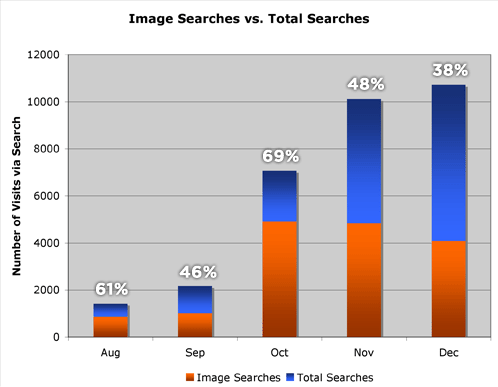
Figure 1. Five month snapshot of Image Searches vs. Total Searches at Pearsonified.
The graph above contains some very unexpected and remarkable data—over the last 5 months, nearly 53% of my total searches have come in the form of image searches! I don’t know about you, but when I think about inbound searches to my site, I’m always thinking in terms of keywords, not images. As it turns out, I probably ought to pay more attention to image optimization than I currently do!
These numbers suggest that the image search market is far less competitive than keyword search, and I’m willing to bet that if you focus on image search optimization, you will reap some pretty huge benefits in the form of traffic and pageviews.
And if you’re anything like me, you’re all over this :)
So now this begs the question: How do you take advantage of image search and rule Google’s wild, wild west?
Optimizing Your Site for Google Image Search
Image optimization is one of those things that falls under the “best practices” heading for Webmasters of all shapes, sizes, and knowledge levels. Simply put, if you are truly running your site the right way, then image optimization is a de facto benefit.
What, then, is the proper way to construct an image reference in XHTML, and what aspects of this help in Google’s image search?
Every standards-compliant, Google-sensitive image reference should contain 5 key items:
- A
srcattribute specifying the URL of the image - A
widthdeclaration in which the width of the image is specified in pixels - A
heightdeclaration in which the height of the image is specified in pixels - An
altattribute that describes the content of the image—this is the #1 element of image-oriented SEO - A
titleattribute that contains text to be displayed when the user hovers his/her mouse over the image

For this example, we’ll use the image of a yellow hot air balloon at right, which is 220 pixels wide by 212 pixels high.
When we apply the five key items from above with the elements from our example image, we end up with an XHTML image reference that looks something like this:
<img src="http://mysite.com/yellow_hot_air_balloon.jpg" width="220" height="212" alt="Yellow hot air balloon" title="Yellow hot air balloon" />
That’s all there is to it! If you’re not accustomed to providing anything more than a src URL with your images, then you are probably slightly dismayed over the additional work that you’ll have to put in here in order to optimize your images.
All I can say to you is this—the benefits from running a Website with fully standards-compliant markup are amazing, and image optimization is one of those things that produces extremely tangible results. You would be wise to do this sooner rather than later.
A Final Word on Google Image Search
Based on my search results from the past few months, I have every reason to believe that Google places a premium on two things when ranking images in its results:
- the
altattribute of the image - the context of the page and the relevance of the
altattribute thereto
Of course, there are other factors that influence how high your images will rank, but I believe that these two are the most important.
Finally, if you’ve been running your site for six months or more, then I guarantee you’ll see some pretty dramatic results from implementing this type of image optimization. And of course, I really appreciate you stopping by to read this, but don’t you have some coding to do? :)
Update: I realize that the type of traffic you get from Google image search is not going to convert well, but you all like to see your page views increase, don’t you? Besides, if you’ve got CPM ads placed on those pages, you’ll see an income boost from additional search visits.
284 comments… read them below or add one
Great post, Chris, and a good reminder that valid code is itself part of SEO.
I’m with you on the results as well, having seen pretty much the same increase since I started “alt”ing my images.
One thing I’d like to add: the images you use should themselves be sized to the on-site version. Meaning, if you have a 400×400 image which you then resize via the line to 200×200 or something, you can end up with a pixellated image. At least, that’s been my experience with our pal IE. If you want a 200×200 image, save and upload it as a 200×200 image, and include the height and width details. You’re golden then!
Thanks, man!
Hey Charlie Brown, I think you have a winning attitude mate. Far too much name-calling around here. Just so you have a word from an image creation kind of guy, there is just no place for stretching and resizing images in your browser. You’re asking a browser to be Photoshop if you do that, and it is just basically always going to be crap.
Image size tags are there only for the browser. They help you lay out your page so that it doesn’t keep resizing while the page loads.
If Google believes that the size of your image is the size you specified, then it is really dumb, so dumb, for real. It will read the image size from your image file, not your tags. I constantly use transparent images as buttons. The true size of the image is 2px by 2px and i just resize it to whatever size I like, to use as a button. Then I can use CSS to animate background hover effects, while attaching an anchor tag to the “glass” image which covers the mouse-hit area.
After looking high and low for DATA that supports the importance of blog sitemaps, I’ve haven’t found any at all. Can you provide it?
Seems to me that if you have a Categories or Archives widget, then 100% of your posts are already accessible by the Google spider.
Wow! Too easy. I guess it’s time to start placing images on my blog. Thanks.
Chris — Categories and archives widgets do not link to all internal pages, nor do they link to all available feeds from your site.
In addition, what if you don’t want all that information in your sidebar? Do you think a sitemap would be useful then?
It’s peace of mind at the cost of one link off your home page. I’ll take that every time.
Good post but I would always recommend using yellow-hot-air-balloon.jpg instead.
Mad4,
I think that’s a matter of personal preference. I like underscores because they are more reminiscent of spaces. Hyphens, on the other hand, are common syntax for combined words and word breaks between lines.
I think the underscore provides a clearer distinction, so I prefer to go with that.
Woosh, I some how stumbled here 3 years after the post date.
Another point I would have added is that the content surrounding the image that gets more importance than the entire article.
Chris P,
I have did an experiment with this. I did a split test with the one using Underscores and Dashes. I somehow found that Google loves Dashes more than Underscores. For the same image, the one with dashes rank on page 6, the one with underscore at page 10.
Are you laying the guilt groundwork again Pearson?
Well I guess you could go play Madden instead…
But does it convert well?
Great article. I had lots of images already in my blog, but now i added the alt attribute.
Chris, if you are doing image optimizatio for traffic, you’d rather know that hyphens are preferred over underscores and your personal preference should play little role here.
Also, I suspect image optimization should be valuable for image-heavy websites, such as online shops, photo galleries, etc. The best way to optimize an image, though, is to write a paragraph of text and put it as close as possible to the image, though.
Yuri – I have a heck of allot of photo optimization to do – can you please tell me where I would include this paragraph of text? My website is a wordpress site/blog.
Thanks!
Google image searches can definitely drive a lot of traffic to your site. I made a “digital art christmas card” a while back. In the month of December this little gem drove a huge amount of traffic to my site.
Yes it was mainly short visits, but still if 5% of these people visiting stayed and read a bit more on my site I’m happy!
TJ, Mark — The traffic doesn’t convert well, but you ought to look at it like fishing. If you don’t cast lines out there, you’re not going to catch anything.
The bottom line for me is that I want as many people from as many different disciplines as possible to visit my site. I feel like Google image search is an excellent way to put your site out there in front of people who would likely never find it otherwise.
Yuri — That’s an excellent article that I’d recommend to anyone reading this post.
Back when I started this site, I was running on MovableType, which constructed my permalinks with underscores rather than dashes. I liked the clean look, and that’s been a part of my MO ever since. To be honest, I had never read anything to speak positively or negatively about either setup, but after reading Matt Cutts’ article, I’m tempted to at least change the way my files are constructed.
I’m hosed on the permalink end of things, but that’s life if you don’t start your blog on WordPress.
Ironically, pretty much the only image on my site visited via Google Image Search is a quick piece of culture jamming I did in response to the censorship of Google China. It still gets a couple of hits each day from that source!
“I think that’s a matter of personal preference. I like underscores because they are more reminiscent of spaces.”
Are you kidding? When you name ain image “yellow_hot_balloons.jpg”, it’s only going to come up for a search for “yellow_hot_balloons.” Who on earth is going to search for that?
Always use dashes between words.
Personal preference or not, I guess it boils down to what Google’s guys decide hey? And seeing as how these things are never fixed and always based on the development of global human behaviour, you must consider the likelihood of a dash being entered, vs the likelihood an underscore being entered.
For a human being, the dash is roughly two times quicker to create, as it requires no “shift-key” operation. It signals that the creator could be human. An underscore is quite techy, and more likely to be written by someone with code knowledge, or easily entered by automation. Dashes represent the lazy human denominator.
Aah, don’t we all just love to theorize? Well, I guess what I’m getting at is that while there is literature out there to be learned, you could save yourself a lot of time by anticipating human behaviour yourself. I’m not talking about anticipating the actions of clever people like yourselves. I’m talking about the guys who walk into Starbucks and let the signage dictate their choices.
When I noticed a big traffic boost a while ago, comming from Google Image Search, I did a little experiment which you can find at How to use beautiful women for website traffic increase.
Halfdeck,
There’s nothing quite like visiting someone’s site and acting like an absolute dick, is there?
hahahahahahahahaha…great response ;-)
Ha Ha, way to go Chris! That’s what I really like about you. You don’t sugar coat anything and you tell it how it is.
Keep on Rocking my Brother!
Cam
“There’s nothing quite like visiting someone’s site and acting like an absolute dick, is there?”
Chris, how is stating a fact “acting like an absolute dick”? Did I call you names? No. You’re the one accusing me of “acting like a dick.” Nice pun on my nick btw.
How about treating your visitors with a little more respect?
One thing you clearly fail to understand is that the rest of the world may not be aware of something that you consider to be common knowledge.
By phrasing your remark like this, you’ve basically framed it in such a way as to make me look like an idiot for not knowing that Google would differentiate (read: penalize?) users for incorporating underscores rather than dashes.
Pardon me (and a zillion others, I’m sure) for missing that line in the handbook.
I do know one thing for certain, however. I’ve built this site (and two others—Tubetorial and Cutline) by providing real-world solutions to “simple” problems. If I’ve learned anything from the experience, it’s that empowering users rather than insulting them like they know nothing is definitely the way to go.
And should you choose to try and use my own words against me here, I’ve already explained to you why I responded like I did.
You could have chosen to take the suggestion route with your comment, but instead, you veered down the path of a pseudo-authoritative insult.
How do you expect me to take that any other way than personally, especially given the nature of the sites I’ve built and now maintain?
Hey Chris,
Don’t you know that you should….er, I mean, I had read Matt’s article a while back and it reaffirmed what I believed about dashes over underscores.
As for the images, that was one of the things I used to score a couple of corporate blog customers.
They had hundreds of products in the “Gallery”, yet they weren’t indexed or even findable by searchers.
I built them a blog, write articles to go with each product image and now they get ‘thousands’ of hits each month just from images.
Now that you’ve alerted everyone, I’ll have to find a new angle.
Like, thanks buddy ;-)
“By phrasing your remark like this, you’ve basically framed it in such a way as to make me look like an idiot for not knowing that Google would differentiate (read: penalize?) users for incorporating underscores rather than dashes.”
Chris, let me get this straight. If I wrote that “earth is flat” on my blog and you post a comment saying “are you kidding? The earth is round” – I’m supposed to take that as an insult? How can you be that sensitive?
I’d either debate you on the point IF I had a ground to stand on, or admit I was wrong and move on. Instead, you’re claiming I insulted you and you openly insult me by calling me a dick.
Everyone in SEO has said something that later turned out to be completely wrong. For example, Matt Cutts once said Google prefers
<i>to<em>. After talking to another Google engineer, he corrected himself, saying Google treats them both equally.I admit I intentionally left a slightly abrasive comment to stir up a little drama, but I’m don’t write mean spirited comments, and my main point of using dashes instead of underscores is something that will help your readers.
I could have gone much further than that by pointing out that your statement “context of the page” is vague. But I didn’t.
Google looks at several things when indexing images, including:
- TITLE tag
- H1 tag
- keywords in ALT attribute
- keywords in urls, IF separated by dashes
- keywords in image PATH
- keywords in the url an image is on is irrelevant
- keywords in text ~10 words radius above and below an IMG element in source code
- image resolution, higher the better
- image must be on a page listed in the main index – Google seems to ignore images on supplemental pages.
- If any of those keywords contain references to sex, the images may be filtered out with SafeSearch active.
- If keywords in the META keyword tag contain sex-related words, the images will be filtered out with Safe Search activated.
Now you can go and steal all my Google image traffic.
One last thing:
Since anchor text is unreliable when determining the content of an image and there’s no link popularity metric for images, Google uses PageRank of the url an image is on as a ranking factor.
The fact that the earth is flat is common knowledge.
Practices deemed acceptable by the Goog are far less ubiquitous, I’m afraid.
That said, you revealed precisely why I was angered by your comment:
This is not a snarky blog by any means. On the contrary, I run it as a facilitative and (hopefully) inspirational resource.
As a result, comments like yours (which are quite rare around here these days) go against everything that I want this site to stand for.
Although I realize it’s probably too idealistic, I believe that both I and my readers can use this site to help one another. Moreover, I hope we can accomplish that through constructive means.
It’s certainly easy to speak with a brash edge from an anonymous podium, but you won’t win friends with an abrasive affront if you’re face to face. I realize that me calling you a “dick” does little to further my cause, but I’m the ringleader around here, and you pissed me off :)
Finally, I am aware of the other points you mention in the bullets above, which is precisely why I said that Google places a premium on the two areas that I mentioned in the post. That’s not to say those are the only things Google considers—they’re only pieces of a much larger puzzle.
Chris, another very useful post. I was just wondering what are some of the top image searches on Google? I would imagine they would be similar to the text based ones… ie… celebrities etc. I know my top image search on my site is Cocker spaniel, which pulls up a picture of my dog. Maybe your dogs may be more important to site traffic than you think…
John
John,
It’s funny you should say that, because for about three weeks, I had two pictures ranking on the second page of results for “dogs.”
In that three week span, those images pulled an alarming 2246 people to this site. If you look at the graph in the post, you can see a massive jump in image searches in October and November, and this is almost entirely due to the “dogs” search. After only a few weeks of ranking, though, my images disappeared from the second page of results, and just like that, my number of image searches for “dogs” trailed back towards zero.
‘I realize that the type of traffic you get from Google image search is not going to convert well’
I always thought image search referers would just watch the image and leave, which would result in near 100% bounce rates. Just recently, I found out that the bounce rate of the approximately 1000 image search referers I receive each month, is close to 50%.
I’ll implement some of your tips and try if I can improve my image search referers a bit more.
I would strongly recommend dashes to underscores.
Why? Because users rarely ever see the image filenames. In this instance, us W3C junkies can optimize for google and not for looks or user.
Also I’ve heard from the blackhat underground at syndk8.net that google has begun considering domain names with two or more dashes as webspam, although I’m not sure if it applies to the image search as well.
An excellent learning activity would be reading matt cutts blog from the very first post, which I’m still doing :)
Or read a quick summary of the 21 best tips:
http://www.seoegghead.com/blog/seo/mattcuttsarama-a-summary-of-useful-stuff-matt-cutts-has-said-p112.html
I tested all three major search engines, and msn is the only one that doesn’t look at underscores as a continuation of the previous word:
http://search.live.com/results.aspx?q=ftp_binary&sourceid=Mozilla-search&form=CHROME
Just a question: Is it obliged to add width and height to be Xhtml compliant? or you can be found without these 2?
Well, I guess if you are stuck with the underscores, it may be better to leave it as it is, indeed.
However, that’d make a nice case study on the effect of underscores vs hyphens. You could easily write a script to replace underscores with dashes and redirect the old pages to the new ones, right?
Franck — By specifying the
widthandheightattributes, you effectively pre-apportion that space on the Web page for the image. This way, as the image loads, it will fill the allotted space without pushing and realigning text all over the page.Essentially, it’s just a sound practice that aids in smoother page loads, which is just another piece in the user experience puzzle.
Yuri — I imagine that if I actually knew how to write a script to interact with my WordPress database, then it might be fairly simple to do.
That said, I’ve never done any direct MySQL interaction through PHP or any other server-side language.
So I guess what I’m getting at here is this: it wouldn’t be easy for me to do right now :)
Thank you for clarifications Chris.
Just wanted to say: I spend all night yesterday to show my archive page for my cutline blog, without success. What is amazing is that I did it on a second blog very easily…
I will try again… next week. I am not the best with technical things. It’s strange, but it seems that everything is becoming PHP.
I’m learning.
This may be a little off topic but I have a question:
What is “Blogger Law” around using other websites and peoples images?
For example, I may be writing an article on dogs on my blog so in order to spice up my post a little I go looking for a dog picture on Google image search and lets say I happen to find one of Chris’s dog pictures which I would like to use. Is it cool to use it or not?
Phil.
Ah, codeland — the only place where adults argue over underscores and hypens.
Thank you, Chris, for reminding us about valid code. I’ve definitely got to get all those images tagged properly.
Phil,
For all of your Blogger Law needs, check out the aptly-named Tubetorial series, Blogger Law 101.
Another great article, thx!
Hi Chris,
I wanted to drop a line and give you a heads up. Some “jerk” has hacked a few SEO blogs and put up a hit list, unfortunately you are on it. I posted about it on SearchMarketingGurus – but I wanted to make sure you knew about it – couldn’t find an email to contact you at, so I hope this is ok – feel free to delete this! :)
~Li
Thanks Li! I’m working right now to try and thwart this.
Hi Chris
Thanks for this series …
Question about img src – do you believe Google treats a fully qualified URL vs relative path to an image differently?
Jason
JasonM,
I don’t think there’s any real difference there, but in spite of that belief, I am always careful to use absolute file paths when constructing
imgreferences. I think it’s probably more paranoia on my part than anything else.Your seo advice seems pretty circumspect or sophomoric, like the absolute versus relative comment above, or the dashes versus underscore comment.
You haven’t even read through all of matt cutts blog, but anyone who is anyone in seo reads it religiously. That tells me you’re new to the world of seo, so welcome to it!
Some friendly but blunt advice,
Heather Frunt
Heather,
The advice that I’ve provided in my series, SEO for Everybody, is nothing more than simple SEO strategies that anyone can (and should) use when constructing a Web site.
I wrote about specific topics because I knew I was mostly qualified to speak about them and relay the information to my readers. However, people have solicited my advice in the comments, and I’ve done the best I can to answer them based on the knowledge that I have.
Obviously, there are times when my knowledge is inadequate, and this resulted in my giving answers that were incorrect.
I’m not happy about that, of course, mostly because accuracy is important to me. However, I have never claimed to be an SEO specialist, nor have I ever been paid to perform SEO services for anyone.
It is true that I composed a series on SEO tips and tactics, but the idea was to present some rudimentary techniques that should basically become standard practices for building a Website of any kind.
So, while I certainly appreciate the critical eye you’ve shown, I would also appreciate it if you’d read the rest of my site. If you had already done so, then you’d know that I’m a designer, writer, thinker, and knowledge-sharer—not an SEO.
In spite of your criticism, the SEO for Everybody series has been quite successful, and I feel as though my readers have not only appreciated, but also benefited from the advice that I’ve shared.
Finally, I’d appreciate it if you didn’t leave a spammy URL along with your comments (I removed it and replaced it with your name, assuming that is your name).
Why is it that people who rag you on your own comment thread have to leave either an anonymous comment or a bogus URL?
A bit new to the world of web design and more so than most on this site, but the post above for me is a bit out of place. Doesn’t really belong in the 21st century. I know there are new posts and old posts, but a relevant post is relevant regardless of age.
The word sophomoric is not useful or accessible to most, and I would like to see a little more constructive input and less moth-in-the-mouth from our friend Heather.
There is really not much to read about SEO apart from one phrase which people struggle to stick to:
“Descriptive, accessible (to the disabled in all shapes and sizes, including robots) and relevant content”. If you’re trying to make money out of it, you should rather be steam cleaning carpets for rich folks like I do for 180K per year.
So are you actively trying to rank for certain images? :p
Mate, its easy to rank well for images. Just name your images well, put in your alt and title tags and away you go.
I’m going to give everyone a funny example here which illustrates my point, which nobody seems to understand. Robots, search engines, everything that ranks your site is blind. So, take a photo, and like everyone else with a digital camera, you think you’re a legend. You name it in all the ways that describe your image well for html and Google understands that you’re telling it what the image is. Now Google, being blind, needs some way to make sure you aren’t holding up a cat and calling it a dog. So, how does it make sure you’re telling the truth? It asks a million other people if they agree with you. This it will check by throwing your image out there somewhere low down, and when someone searches for a cat and clicks on your image, it will start believing it is indeed a cat. The more clicks it gets, the more it will be viewed by Google as a popular image of a cat. This is why hot babes somehow get mixed in with unrelated searches.
Hope you all enjoyed my thesis, but if you can think of a better way that robots may think in an automated and effective way, then post it, because Google will be thinking this way. Coding is secondary. They are essentially helping a blind robot to see.
Heather’s quite the —what’s the word I’m looking for—??? Chris, I appreciate your site as I’m not a self-professed expert anything, including SEO. I’m a guy who can’t even find time to get what lame content I generate onto Cutline. I just lurk, read and learn (often quite slowly). Would that I had Ms. Frunt’s command of all this stuff. But, alas – I do not. Keep writing so folks like me can keep learning.
Dang people – SEO isn’t anyone’s “bag”. Sure there are some hard core elements we’d do well to nail down, but SEO is as dynamic as it can get. I wouldn’t dare to call anyone a specialist. I know I’m not, but then I’ve only been in the game a few years and don’t play it hard.
So, back to the subject of images and such…
I have a personal blog at http://www.ohmystinkinheck.com (yes, that ‘s its name) and have found that flickr is a nice way to draw in people as well.
I used to upload my images to the server via FTP and didn’t fiddle-faddle with the likes of flickr. When it first came out I ranked it right there with photobucket and shutterfly for sharing images.
I was wrong.
I’ve just started blogging again after quite a siesta and flickr can really drive people to your site.
Right – the traffic/ctr/blah blah blah … might not be absolutely targeted, but there are groups on flickr that can be targeted that would match your audience.
Anyway, my two cents.
*ducking*
Oh, sorry – important note. If you blog directly from flickr it’d serve you well to make sure to remove the alt tag “photo sharing” for something more relevant as well.
Or set it up to take your title tag and make sure you don’t just leave your image as a number when downloading.
Mario — Not for anything in particular. As a whole, though, I am actively constructing image references so that Google can find them more easily.
I don’t have any subtle profiteering scheme going on, although I suppose that if I really tried to hit this hard, I could make a buck here or there solely through image search exploitation.
Again, though, that’s not my bag :)
Leonard — Thanks!
ChrisP
In Google Webmasters you can turn on enhanced image search for your site.
Do you know anything about this ?
Jason
Jason,
I just completed the verification process and opted into the enhanced image search program. I’m going to follow up with a post about the Google Webmaster toolkit soon, because I think it contains some interesting stuff and procedures that any Webmaster should know and do.
Regarding the enhanced image search, here’s what I think is up:
alttag of an image of a watermelon say “Britney Spears” in an attempt to scrape traffic, and this enhanced image search pretty much eliminates that possibility.Chris,
To take advantage of image search, do the images need to be hosted on your site? Or is there still some advantage to “alt” tagging the images that you hotlink?
To Chris, sorry I didn’t read your site, other than two posts.
The best beginner seo book which I would recommend is Search
Engine Optimization For Dummies, which is very
good forthe absolute beginner.
If that’s too easy, the only other SEO-related book that’s worth any of your time is Aaron Wall’s SEO Book.
Bwahahaha – Heather, Chris DESIGNED Aaron Wall’s site. He is all too familiar with the book.
Laff, Heather, thanks for jumping on that one for me. I had SEObook.com queued up in my browser this morning so I would remember to comment, but you beat me to the punch!
OK. I answered my own question by looking in my logs.
The answer is YES – in fact, often times hotlinked images outperform the original.
Micah,
I thought I had answered that, but I just checked through the comments—nada.
Sorry about that, but my guess was that hotlinked images wouldn’t be any different than regular images.
Your results are pretty interesting, and I guess we all know that Perez Hilton is getting tons of inbound searches from hotlinked images as well ;)
Chris,
You may be interested in the Yahoo SiteExplorer [beta] page aswell – this one seems to be buried a little deeper. (https://siteexplorer.search.yahoo.com)
Im putting together a page for my clients to help manage all their pages – havent been able to find anything for msn with any real substance.
Great information, I’d just started doing this with images but your post gives me even better steps on how to do this. Thanks.
I ran a test on my blog a couple months back and it offered proof that the big 3 search engines pay no attention at all to the TITLE attribute of the image. ALT attribute – yes. But not the TITLE.
Matt,
I recommend the use of the
titleattribute because it creates tooltips in Gecko-based browsers (read: good ones) when the user hovers her mouse over an image.I agree with you in the sense that an image
titleis not going to affect your rankings one way or the other.Thanks for the info. This will helps as I dont have a blog I’d have to go back and redo. I can implement this now and use it as I go. One question though…what software do you use to blog with, or do you just use the WP interface? I’d like to find a robust offline blogging software, one with plenty of features that implement good SEO tactics easily.
Rian,
I use (and highly recommend) the open source version of WordPress. Slap the Cutline theme on it, and boom—instant SEO gratification.
I actually am using the Cutline theme and like it alot. But I was trying to customize the style sheet and a few other things. In the process, I probably broke some of the basic formating. So all you use it WP? No offline tool…the Zoundry tool I’m using now is driving me nuts. I’ve spent more time trying to get formating right, that actual blogging.
i wonder with the new production release of GIS changes the value of alt and title tags. probabaly not but its a thought. but i must say i miss having the dimensions displayed. stylish script here i come
I’ve long since been a staunch advocate of using the ALT attribute on my images – and I frequently use the TITle attribute on hyperlinks – but I had never heard about using the TITLE attribute on images. I’ve added this into my blog posting regimen.
Now, about the page title, however… Since I’m using Blogger, it generates each page off of a base template so every blog post page bears the same title. Any suggestions about getting around this? There are other pages within my site, of course, and I do use unique and meaningful titles on those.
I also have gotten a big increase in traffic from Google Image Search, starting on October 18, 2006. I track traffic with SiteMeter, and went from an average of about 30 visitors a day to 1,300 on thte first day. The bump up has continued to the present, although not quite at the same level. The only bad thing is that the nature of the searches is such that it has encouraged less “uplifting” blog posting, although doing normal posting has not noticeably detracted from traffic. Traffic now depends on Google behavior, which seems unfortunate. If they changed what they were doing, for whatever reason, they could have a big, negative impact on a lot of sites and blogs. Of course, even from normal Google searches, that is true. Just look at the “Google Sandbox Effect” and the effects of the new release and policy in late 2003.
Interesting. I never would have thought about optimizing for image searches. Thanks for sharing; doublely so for citing actual traffic data.
Hi Chris
I finally found time to go back and get busy re-coding all those images. Not quite done yet, but well on the way. It takes a while, so it will be interesting to see any effect.
In selecting new names for the images, it struck me, though, to ask you whether you see benefit in short, snappy single word tags (like your ‘dogs’ example, up above), or whether it’s useful to go for multiple tags if there are multiple subjects in a picture, or if more detail is required.
For example, would ‘darren clarke ryder cup k-club ireland 2006′ pick up more hits, more easily, than ‘darren clarke’.
Using multiple key words within an image tag creates a much longer image url, but is it more SEO-optimised this way ?
To Roadsofstone – remember that the purpose of alt tags is for users who cannot see the images – whether because they are blind or because they have images turned off in their browser (text only). Alt tags should be named with that as their primary purpose. I think Google gets wise to alt tags that abuse this purpose.
Be careful about renaming image url’s. The google image bot does not spider very often. If you change an image url it may be months til it gets crawled and indexed again.
Chris, thanks for these fabulous insights and tips. I will try to implement the tech stuff as best as I can.
Thanks again for pouring your heart, mind, soul and wit into your posts :)
Lawton
Hi Chris, nice post (and cutline theme :) )
How are you monitoring your referals from Google and Yahoo search? What software are you using?
I am not sure what Chris uses, but I use a combination of Google Analytics, the premium version of IndexTools, and the upgraded version of SiteMeter. Google Analytics and the low-end version of SiteMeter are both free. Google Analytics has a nice pie chart view of where your referrals are coming from. My percentage of Google Image Search referrals is high, typically over 50% on days where the visitors are now usually 1,000 a day or more. I have seen periods where referrals from the various international versions of Google Image Search have been 90%, if there is some hot topic.
Chris ,
id actually considered this route recently and will be taking your article , digesting and actioning soon!
Cheers!
Hi Chris
Firstly, RESPECT: I’ve recently “upgraded” to your cutline template: what a superior piece of software engineering and user-friendly, and spacious, elegant layout – that really suits my travel-blog madness, very well … thanking you for your efforts.
I’m not a total-technie and I use the basic.com- version and was wondering if/when you will add random headers, an archive that also lists all blogs by title, the option to switch to black background/white text, and possibly page layout templates beyond the two basic ones offered … I realize this is – work … But, these are only suggestions for an upgrade; as CUTLINE is well cool, as is !!!
http://thecandytrail.wordpress.com/
OR: http://www.thecandytrail.com/
Check me out sometime … say, Hi
REGARDS – MRP
OK, I may be coming late to reading this but it remains great stuff – and a topic I’m very much interested in. Well worth getting more info about – Thanks for the insights.
i’ve optimized my images at some of my blogs but no change in any traffic. I have hundreds of images at my blogs! How long before Google finds it!? I’ve also opted into enhanced image option in web tools at G.
I am not sure how good an example I am, but to show you what can be done: my average visits per month in September 2006 was 18.77. In October, when Google started feeding image search traffic my way, the average visits per day in the month was 417.55. In February 2007, average daily traffic was 1238.21. In March, it was 1288.52. So far in April, it is 2270.91. This is for what has become my high traffic blog. A very high percentage of traffic comes from Google image search. Most of it is from North America, but a the next greatest amount is the UK. It decreases from there. The big increase is due to images, and very little else. But it is partly due to what I am doing, which is celebrity gossip and current events commentary. I don’t know that exactly what I am doing is repeatable.
I realized that what I just said may not be helpful enough. Basically, what is getting me results is linking to images that people want to see (it makes sense, after all). I almost never have the images inline, but have popup links. The images are relevant to the textual content. I would expect that Google would punish someone who was using images in a spamlike manner, where they were not relevant to your content. I am not sure what that means for a commercial sales site. Since the commercial purpose of what I am doing is to attract traffic to see advertising relevant to my content, it works. The key is to have images that people are searching to see. Without that, images are useless.
I get all that. I’ve used only photos that relate to my sites. I have stuff at http://kosamuithailand.blogspot.com as well as hundreds of photos at the main site, http://www.thaipulse.com in the Ko Samui section. I think I’ve optimized them all ok, except maybe the height attrib. isn’t on the blogspot images. Is it THAT important? Again, HOW LONG does it take for Google to index these changes. A month? Someone mentioned 6 months and the changes will definitely be seen – but how quick usually?
There is the Googlebot and the GoogleImageBot (names probably not exact). The ImageBot comes rarely, perhaps 6-8 months between but crawling during that time. The other crawls for text and adjusts in frequency to your updating history. Give it relevant text to crawl – use descriptive text links to larger views of your images. This will show up eventually somewhere in the image results. I think this is what Jim Bender means about pop-up images?
Vern — If your domain is 6 months old or older, then you ought to see your images indexed relatively quickly (like, the next time Google indexes your site). For sites that are out of the sandbox, these types of changes usually take effect very quickly.
Thanks for the great article! I’m definitely going to implement some of your suggestions.
I run a photoblog that has been up for less than two weeks. My daily hit count was at about 3 until one of my pics made it onto the first page of a google image search. I was shocked when I logged into sitemeter and it read 450 unique visitors for that day! (small numbers to some of you, but huge to me!)
Great post!
I just learned how-to put images in my blog last week, and I look forward to working hard on this particular SEO tip.
Wonderfully informative post, Chris! One of the reasons I moved to Wordpress was the opportunity to optimize my blog for image searches. As I blog about guitar related matters such as guitar building and design, I have a bit of photo content to potentially leverage. Thanks so much for the information!
How interesting.Very informative post – as always. I don’t have that many photos on my blog, however from the ones I do have I get many image searches. I’ve always wondered why I’ll have to consider including more, or at least include more often.
I for one can absolutely guarantee that this is great advice for everyone to follow. My site may not have top of the line and up to the minute high quality content. But each and everyday, I receive hundreds of hits from google, msn, and various other search facilities, with people looking for images. I for one say, this is one of the major factors that drives a heavy portion of the new visitors to my site.
Wow. I run several sites with tons of images on them because they are artwork sites, displaying and selling original art work. This image optimization could make a huge difference.
Thanks a lot.
This looks like a good discovery… I am going to implement this right now.
I am amazed at how simple yet effect this seems to be. I will be furiously changing all of my images posts to be correctly picked up by Google’s image search.
I have observed a high rise through google images in recent months.
For this what you have to do is a basic thing just follow coding standards and eventually you will get the results.
I think the blue section of your graph should be “Other Searches”, not all searches (as far as I can tell the bar as a whole represents all searches).
I gather defining image dimensions via CSS will not help search engines determine their size? Pitty as it’s often convenient to define image sizes in CSS.. still allows the browser to reserve the space but doesn’t require extra attributes in the markup.
Good solid advice about images; I’ve noticed similarly that Google Image Search drives a lot of traffic to Le Blog Exuberance, my blog.
Another key aspect of site development is writing; I’ve put together a list of writing for the web guidelines, which I have all my clients read if they’re going to do the site writing themselves (even if they’re not professional, or particularly good, writers).
Thanks for good advise.
Thanks for this wonderful tip!
Question: Has anyone tested using the longdesc tag to see whether it helps get better Google Images placement?
David M — I have not tested that, and I haven’t come across any posts where people talk about using
longdesc, either. I’d be interested to see if that makes any difference or not.I’ve been using alt tags since I put my first image on my very first website (honest), I just did a quick check of the image SERPs for one particular phrase “cosmic dawn”. The image with this alt tag did not show up, but my RSS newsfeed logo did, clicking the image in Google Images took me to the page entitled Cosmic Dawn wherein lies the original image with that phrase as its alt tag. Odd.
db
Re: comments from Jan. 19 on hotlinked images results in image searches – I have been perplexed at the great image search result/rank? of an image on another site linked by a descriptive text link on my site. Image result returns the image in some cases in first place, with the name of the originating site, but clicking the google link leads to the page on my site where the text link is located. Visitors land on my site. (Its no traffic to speak of, but still..) Why doesn’t Google direct to the site where the picture is hosted? I am not even showing the picture on my site, though the text link is to the image’s url. Separately I have a descriptive text link to the site where the image is hosted in its context. And of course the context of my links is topical. I don’t think this is a hotlinked image but am not sure what one calls it or if its ok this way.
great post, I have always found that image links are a little less weight than regular text links for SEO. Google image search however does crank up the volume of searches.
Great article. Actually – quick question – anyone has any idea what’s beter for the name of the image – dashes or underscores?
nice tip , i’m not using google image search on my sites but i will try it and share my opinions
thanks
Valuable info.
@Stanley:
According to Matt Cutts, the dash is better, but soon the underscore will be counted the same way.
Tha’ts good, I am for hyphens! :)
Go hyphen! Go hyphen! Go hyphen!
I have a question. Does it matter if the images are on my server or on Photobucket? Because I used all the tags and I remember getting double the traffic I have today.
I moved to PB due to bandwidth issues and I don’t know if it’s because of that.
I have seen the decline in traffic from Google Image Search over time, as they must be doing some things differently. I am now mostly hosting images for my blog on Blogspot. Traffic peaked back in May and June and then started to decline in July, with a big bump up in mid-September. Traffic from this source is pretty tenuous, as Google will continue to evolve and that will affect traffic numbers.
Jim: I don’t understand your reasoning for why image traffic is “tenuous”. Yes Google tweaks the algorithms resulting in varying results but that’s also the case for traditional search engine traffic.
Results in general will vary but image traffic can still be a good source of traffic for the topics.
Is that what the google.com/referral ‘s are in analytics, people using image search?
mlankton — I think it could be either Google search (most likely) or Google image search. I’m going to guess it’s the former.
You’ll see it as “images.google.com (referral)” in your analytics.
By the way, I started using the longdesc tag on one of my sites and now have quite a bit of image-generated traffic. I can’t prove longdesc is the reason — also got a bunch of backlinks around the same time. I wish I had done a scientific test of some sort to see if I can attribute having more indexed photos to using longdesc. Anyways, I’ll keep using it. SEO aside, it’s great to make sites more accessible to everyone.
Great tips,
I turned on the image search quite a while ago but forgot to start adding alts and titles. GOod reminder to get that into the code.
Hey Chris, thanks for being a great resource for newbs to this stuff like me. I like how you make things user friendly and btw, I am using your cutline theme on my blog! Looks great!
Thanks for this great insight! I had no idea thee was such a thing as image marketing. I always thought they were just pretty items on our site.
Thanks a lot!
I couldn’t figure out what I’d been doing wrong. Now I believe I need to specify a “width” in order for Google to find my images.
Michael
You made the Cutline theme too!? Nice work, I really enjoy it. I wish I could use subscribe to comments plugin with it. Does anyone know if I can simply add the “width” of the images as a shortcut and just leave out “height”?
Hello Chris,
I appreciate the blog you’ve done here. It is very informative and helpful.
I have a website, blog, and forum. I would like to set up google advanced image search. I am using your information here and have another source to investigate before making the modifications.
My question to you is this:
On my forum, where there is a vbulletin…
I have a bunch of images on the site and when I post an image in a thread I can either attach it, or I can link it with BB Code Tags [IMG*] of course. My question is how do I optimize forum images or images on the forum with the HTML without allowing HTML all over my website? I mean, I don’t want users to be embedding HTML in threads of course.
Is there any quick way for me to optimize them all? Like a code to cover all images with alt tags for titles of the image, without manually inserting it for each one?
Anything I can do in the Administrator CP with your suggestion here?
Thank you for your response Chris,
Legion
I must admit, I’ve never used the “Title” attribute before for my web images but will start now post haste!
I’ve always used underscores for image alt text and I’m positive Google gives credence to all words now as separate keywords.
Thanks for the info.
Im implementing this right now, I did know that alt attribut would help, but had no idea i was ment to implement width and height.
Ill report back with the results I get.
After a week with no response and the fact that I see my emails were edited out of my previous post for no reason at all, as well as my comment edited. It clearly shows that you most likely have no idea the answers to my questions.
I’m not upset or putting you down, it’s just unfortunate. No matter though, this isn’t really as important as we’re making it out to be here.
Thanks anyway,
Legion
What is meant by “tuned on image search”? Where do you go to turn it on and how?
@Joni – Go to your Google Webmaster Tools. Click “Tools” in the left sidebar and then click “Enable Enhanced Image Search”.
There’s a check box to enable it as well as a link that explains what the enhanced search is about.
Hope this helps!
Wow great info hear and all for free, congrats on the excellent site dude!
It’s a humbling realization to think that I had a “novel” idea last week by thinking I should optimize my images, only to see that this post is over a year old.
Thanks for the info, great stuff.
Since I’m here… I’m using your cutline temp for my blog. I was wondering if theres an easy way to limit my widgets to the homepage only. I’m a little worried about PR leaks to unimportant pages, and also having duplicate content throughout my site. Any suggestions? Thanks again.
Len
Hi, Chris. I’m a user of your Pressrow theme, which is fantastic! I’ve been browsing through some of your tips latley and the one problem I keep running into is a problem of basic ignorance on my part. I just don’t know how to play with the code underlying my blog.
Great post, traffic from images does convert for me.
Btw, guess what i found in google image search http://images.google.com/images?hl=en&q=yellow+hot+air+balloon&um=1&ie=UTF-8&sa=N&tab=wi
(click the 3rd image)
Ha! What does “The Dick” have to say now? I vote for underscores.
Len
Hi guys, can someone explain why google doesnt find ANY of the images on this page: http://www.zastonj.info/pobarvanke.htm
“pobarvanke” should be the magic keyword which works great on web search (1st page) but image search is another story…
I had everything set except for the Long desc, which I have only added right now. Does the size matters so much?
Thanks a lot!
Dude, firstly, the link you specified doesn’t have any images.
Secondly, the 1st link I clicked contained badly named images.
The rules again, in order of rank for 2011.
- image file naming must be descriptive within 3 to 5 words, and then .jpg.
- alt tags (alternative text to help the blind etc to understand the image)
- title tags to show people who are not blind what to do, or give more info than the image is giving.
- use dashes in favour of underscores, because it shows you are a lazy human who doesnt want to use 2 keys to make 1 symbol.
- cater for the blind and you cater for robots, because they cannot see. Google is a robot and is blind.
I’ve found that image file name is also relevant.
For a short time period my blog got tons of visits from google images with a keyword that was only written in the file name (it was called “pija”, cock in spanish!! no questions, please. lol) and ranked first in all google images!
Width and Height are not mandatory. I have done a lot of research on this, and they are not required according to W3C specs. The only reason why people used to suggest Width and Height in the markup was to speed up layout rendering in “table-based layouts” only. The rendering engines needed to determine the dimensions of every table cell before the table could be displayed.
Nowadays, many sites have gotten rid of messy table-based layouts for CSS/XHTML layouts. So, if you don’t use tables, you don’t need to specify the width and height in a tableless layout because the rendering engine will just flow the document and its components as they are downloaded, and make adjustments on the fly.
Also, keep in mind that the extra text required to write out all of those dimensions. If you have lots of photos and you’re writing out the dimensions on every image, you’re just slowing the page down with a few extra kilobytes of text in the markup that aren’t really necessary, especially in a pure CSS layout.
Finally, placing the dimensions of an image in your HTML is purely for styling. Google does not utilize this information because one could easily take a 2000px by 3000px image and scale it down by putting 200px by 300px in the image tag. So, the information is not only unnecessary, but it is also unreliable because it is intended for styling purposes.
I hadn’t thought about the images being searchable. Nice one!
Well, this gets me moving – all these years putting off ‘alt’ and ‘title’ descriptions.
I thought “remarkable data’ was going to be: image searches peaked and declined, suggesting image traffic eventually leads to increased keyword popularity or ranking. Another way to read fig.1?
And re the move to WordPress [post Nov 6, '06] – I’ve a regular site plodding since Dec ’03. As I write (Mar 08) just incorporating a few WP blogs into its structure that were standalone non-events. The combination this month alone (the first month) has sent my stats through the roof. Far, far more than site and blogs totaled.
Two weeks into 1st month since change, the website has 200% more uniques than any previous month. Suspect its also playing to ‘one big site’ better than ‘lots of small separates’
Anyhoot, thanks for your great and generous sharing of information.
Phil
Chris,
I am new to all of this. The code part is fascinating/addicting to me but its all very new. I’m using your cutline theme for my blog, and I can’t get the title=”…” part to save. I can adjust the alt, the height width etc, but when i save, the title part is just, gone. I looked in the forums and saw a couple of other people with the same problem but was not able to find an answer. Help a newbie?
Hey – Thanks for this great roundup! I’m just researching various standpoints for image optimization and your post is the #1 post in the todo/toread list for my team!
thanks!
Christoph
Jenn — Are you an Administrator for the site, or are you an Editor? Whenever I’ve encountered this problem in the past, it’s been because the writer was not an Administrator. By default, WordPress will strip additional markup (
classandtitleattributes, for example) for everyone other than admins.Also, if you still experience troubles, try turning off the WYSIWYG editor, and then save your post with changes made only in code view.
Thanks Chris! That was an easy fix and totally worked.
Actually, never mind. I was using my work computer which defaults to IE and IE appears to use the “alt” as the hover words. At home I use firefox, and I’ve changed the settings to have me as admin and I’ve tried turning off the editor and stuff and it still strips the title. I don’t really care because I’m just blogging for fun, but it is always super annoying when things just dont work. It seems to happen a lot for how smart computers are supposed to be. Grrr.
Chris, I didn’t have enough time to read through all 160+ comments, so I apologize if the following was already mentioned.
While I like to see my page views increase, I would not want that if it means that people doing Google image searches arrive at my site so that they could steal my photos. I know for a fact that many image searches are done in an effort to not pay for stock images and as an easy way to find “just what you’re looking for” to place on your blog, your website, whatever. Many people know more than one way to save an image from a site to their pictures folder.
I have for years included alt attributes on my images (and keywords in the image’s URL, with dashes). However, it’s because I know that some people who land on my sites as a result of an image search land there in order to swipe the image, many of the self-taken photos on my sites include some type of identifying watermark or text. If they are going to steal the image to use on their own site and don’t want the watermark/text, they’ll have to at least spend some time photoshopping it.
It’s the only solution I’ve come up with that doesn’t make it easy for image searchers to use my photos without having to put a little elbow grease of their own into it or risk looking like a thief. I’ve found that more often than not, copyrights mean nothing to image searchers. I’ve even heard some people say they think that Google image search is a free-for-all to take images off the web.
Yes, it is a great idea to watermark your photos/images with a copyright symbol, your name, and or your website URL. This is good for business.
I save a lot of photos/image to my computer just because I love the photo and want to look at it again and again. Or because I get color ideas from the image or design ideas. I like it when the image owner places their URL on the image because then I can remember to visit their site again.
Not everyone that downloads an image will use it to break a copyright law, but yes I understand that many, many people will.
I use Google image search to look for photos of whatever I am researching. Good photos many times leads to good text content too.
Say I want info on horse hoof problems. I can use the Google image search for “split hoof” and find clear photos of this subject which then leads me to the web page that talks about this problem and has photos too. I am a visual person and I understand things best when they are illustrated.
But, yes, I agree, I do think a lot of people do use Google image search for stealing images, but not everyone.
Thanks for another great tip, Chris!
I have an image in every single post or page on my site. I thought of just how much work that’ll be to add all that stuff and wondered if there isn’t a plugin out there that does that. I searched a little and found exactly – that! It’s called SEO Friendly Images and works great. Thought I’d share that! :)
Yes, This a great information. I was wondering for its. i had little idea about this. Now i can do this with complete information. Thanx for this Image Search Optimization.
That’s a great idea, especially for art and craft websites like mine. Thanks!
Based on my previous experiences with google image search – Is the traffic that effective? I’ve had a gaming blog and with all the images from it I was recieving fine traffic from Google Images. But let’s talk about *targeted* traffic? How can you offer your content to a visitor who’s looking for images. On my site the usual GI-based traffic had an average-time-on-page of less than e minute.
What are your observations?
I agree. It’s very rare that traffic from images would attract a potential customer. Usually the visitor doesn’t even see the page content as he goes straight to “show full image”. But on the other hand if you are selling a product which might be found with images, you have much greater chances of being found…
PS: Google only scans images when the page is 6 months old (my observation).
Chris – thanks for the awesome post on a topic many SEOs leave aside…
@Pobarvanke – very interesting observation – we’ve seen images getting indexed a lot faster (on authoritive sites) … how old were those sites you’ve been waiting for 6 months? where they new ones?
Good article. I can confirm that image search for some niches is highly effective. A friend of mine had some images for a touristic destination and since he optimized the images in his site he receives quite some traffic from image search results
Thanks Chris.However I am still unable to get indexing on my images from google. Its been a few months now and still no joy. We appear to have good SEO on the the web but its image optimizing im after.
Please take a look at my code and tell me if yopu think its right. I have spotted a few minor changes when i compair it to your “yellow hot air baloon code”.
Please help !!!!
Secondly, take a look at my sitemap if you have a minute. Have I done it corectly.
http://www.hygieneextreme.com/sitemap/
Look forward to hearing from you.
Best Regards
Syd Dollman
Sid Dollman – the Google image bot does not come around very often. Also, the default ‘moderate safety’ filter has been tightened around February. Do a ‘site:’ image search with your safety setting set to ‘off’ in the Google image search preferences. You may find your images have been indexed.
Great information here, really interesting.
But what I missed is a small detail I use for Keyword SEO, I get them PRIOR to my website building work.
So how can I know for WHAT I have to SEO my pic’s ?
Is the Google keyword tool as well the place to go ?
Sorry to sound like a dummy, but I’m a marketer rather then a SEO guy and don’t like to spend my time optimizing some for nothing.
thanks if anybody can explain.
G.
Chris, Great blog! I have two different blogs and I found out this information just by tracking where my visits came from. All of the sudden I had little or no visitors and then all the sudden I was getting daily visitors due to my images. Google picks up pictures from my blogs and also my website.
Thanks for clarifying for me exactly how it was done.
@Presell Page Man
Yes my web portal was created and indexed in November. I’ve immediately added many pictures on the page (alt and desc included) but they just wouldn’t show up on Google… After few weeks of waiting I enabled “Enhanced image search” option within google webmaster tools.Nothing happened.
After exactly 6 months of operating (May) all the pictures appeared on Google image search (new and old images). Now I’m happy :)
Nice article Chris. I like the way you expose the hidden value in simply following standards. I have to take the hyphen-separator route myself, though. Underscores can get ‘lost’ when a URL expressed as a text link is underlined (very common). Can be frustrating for someone typing in a URL from a printout.
Re James E (Feb 25 08): ‘Author’ CSS is trivial to disable or override at the client, leaving the browser clueless about image height and width. The fact that the Strict variant of XHTML accommodates these attributes suggests there must be some compelling reason for their existence.
Hmm. Chris, I hate to come across as a moaning old fishwife, but the Feb 25 08 post I alluded to earlier seems to have escaped to the 97th dimension during these last few hours.
QED?
Anyhoo, I still support your recommendation about height/width attributes, and I’ll argue they have nothing to do with ‘style’ as was alleged. Incoming bitmapped images have dimensions which are real yet entirely arbitrary and un-guessable. Passing a hint in the markup makes perfect sense, and only helps performance.
I do hate it when a page has to completely re-organise itself in response to late-breaking news about the size of an image.
Remember, not all ‘media’ is ‘screen’. And, like javascript, CSS support — or even CSS capability — is not guaranteed.
Jeff M — No clue about the Feb. 25 post… I certainly didn’t delete anything, if that’s what you’re asking. Perhaps his comment was on a different post?
And yeah, nothing worse than a page that shifts and moves while images load.
Update: found it! Here’s the comment you referenced.
Groovy. I was looking a year behind. Man this thread has whiskers. My Bad. All My Base Are Belong 2 U.
What’s with all the K2 stuff in the Cutline functions.php btw? My custom error handler has been blowing since I upped to WP 2.5.1, but I wasn’t expecting…
[8: Notice] Undefined variable: file \wp-content\themes\Cutline2pt1\functions.php Line: 199
Off-topic I know, but while you’re down there…
OK, now we’re cookin’ with gas. Thanx CP.
James E:
“…rendering engines needed to determine the dimensions of every table cell before the table could be displayed…”
This was/is true of any cell content. Including text, which had to be rendered first. If you know the nature of the cell content, you can maybe use table-layout:fixed. In most other cases, don’t use tables.
James E:
“…the rendering engine will just flow the document and its components as they are downloaded, and make adjustments on the fly…”
Giving us the page-shuffle migraine we all know and love.
James E:
“…the extra text required to write out all of those dimensions. If you have lots of photos and you’re writing out the dimensions on every image, you’re just slowing the page down with a few extra kilobytes of text in the markup…”
And the ratio of markup (ASCII) size to image file (binary) size is about what? How many images are you putting on your pages, dude?
James E:
“…Google does not utilize this information because one could easily take a 2000px by 3000px image and scale it down by putting 200px by 300px in the image tag…”
Lies are language-neutral. You can spin them in either HTML or CSS.
And your killer argument is…?
FYI: As of 7/12/08, you own the #1 image result in Google for “yellow hot air balloon.”
Chris, should the images be hosted on the blog or will they be indexed with your URL if the image src is offsite (say wikipedia?)
Good tips I have been getting lots of traffic from images as well.
Alt tags and filename as well as the text and titles surrounding the images had an affect in my experience.
@ Aaron I have images hosted on wikepedia that bring me traffic so i think it does not matter.
Okay, How do you set the Title attribute without it showing up on the page. Whenever I do it, I see the title underneath the picture. I notice that in the above example, the title option is set but I don’t see it.
I tried this on the default Thesis theme….
On my opinion the name of image is important too – try to give the “speaking” names, use your main keywords in these names
Great information. I wish I would have found you a long time ago, now I see so many mistakes I’ve made it in the past! I’ve got a lot of catching up to do!
Thanks for the insight.
That information was cooool…I have 1 doubt…I uploaded lots of images in my blog…(see url from my signature…I did the title thing n alt text also for all of d images…The posts r getting indexed by google in 10 min but even after 2 or 3 months also, the imges r not at all getting indexed….wat could be d problem? plz help me…
this is very useful info about gaining the good ranking not only for your image but I thing it would be better for your site over all ranking. I think if you submite your site in few directories regarding the source of images (which are placed on your site) it would be also better for high rank in the google image search.
Google Image Search..Ahh Thanks for pointing toward a very mysterious way to make more traffic..I’ll try later on with all my image…hope it’ll work for me.
Awesome thread, particularly the image optimization.
It’s funny because I often search for images to use or to get ideas from, and I pretty much always use Google’s image search to do it.
As an affiliate marketer, I use the vendor’s images most of the time for the product shots, and Google gets me there in a hurry.
I guess it never occurred to me that when I was doing those searches the resulting sites were gaining traffic as an indirect result.
I have more or less disregarded image insert syntax, and looked upon alt tags an size tags as a bothersome chore (bad, bad boy!), but the light is leaking in on this for me now.
I don’t use a heck of a lot of images on my blog, but I believe I will give them a good going over now :>)
What is the stats program that is depicted with the graphing in the top of the post?
Cheers,
Ron Davies
My jewelry images in my shop are invisible to Google Images….. What can I do? My blog & other sites I sell on get Googled…. Off to try my alt tags!
Tara * 3 Rexes.com
Thanks for the advice with specifics on how to do it efficiently, the right time the first time!
This is great advice. In addition to proper alt= descriptors, I’m also very careful to make sure I name my photo files with SEO in mind. why not name your picture description.jpg, rather than photo187645.jpg?
I’ve done some recent investigation into Image ranking on Google and put my findings here—basically showing that Pagerank of page containing the image and proximity of search text to the image are the most important factors getting a high ranking on Google Image search. Hope this interests someone.
Hi, Thanks for this post.
From my professional experience the primary factor overall has always been the relevancy of the anchor text and page authority of the backlinks coming to the page that is supporting the images. But without the compliment of the parameters you have recommend (all except the title attribute which i would argue has no value other the 508 compliance) needs to be in place or the images wont be recognized anyway.
One Clarification: I meant the optimized anchor text on the pages that are linking to you. Not so much the anchor text on the page with the images.
Hey,
Nice post – I’ve recently gone ahead and tagged all of my images on my site because even though there might not be that much weight attached to it, it is certainly still worth doing for positioning (i.e. so Google knows just that bit more about your site). I have had a bit of traffic from these images but as mentioned above, conversions have been low.
Cheers,
Alex
Great tips! I’m going to start changing all the alt attributes for my images. Thanks!
Thanks Chris i could improve my hits because of you…though its still the beginning but its really working
Great article dude. Keep posting! :)
nice work, I have seen this work for me with a previous blog.
Wow!!!!!! I used your instructions and up my uniques from 1500 to 2500 per day. :) I am very happy.
Thanks a lot for your article.
Thanks for the info about images, I’m using google image searches constantly for fun, but didn’t know I needed to do something about the images on my site. I’m using your Cutline 3-Column Split 1.1 (Thanks!) and would like to change the header images to ads, can that be done? And where would I add the code you described to any images I add? This is a new website, just a couple of months old, and I don’t have any images yet, but really see the value of what you say! Thanks for sharing your tremendous themes, and your assistance!
Great advice – it should become second nature so you need to read them over and over again. Get it right first time, at the beginning, and you’ll be ahead of the game from the start!
Chris, this post is 2 years old, but still there are a load of people who still don’t know about this. An SEO guy told me about this a few months ago, but to be honest I didn’t pay that much attention – now I’ll sure to give it a go. Thanks for the tip.
I think that contetn below the image is also important
Most people using images because to make their blog more nicer. Me too. But then I read so many times images search also can bring traffic to site, I start to optimized them with long tail keywords or keyword related on the pictures name and the alternate tag.
I expect that putting the height and width attributes in the style tag is as good as the height and width tag. I try to stay as strict to XHTML 1 as possible. So I expect style=’width:150px;height:234px’ is as good as width=150 height=234.
Ted — Not sure where you’re getting your info, but what you’ve described is the cardinal sin of HTML and CSS markup. The entire theory behind this process is to completely separate style from markup, and adding a
styleattribute to any HTML element is in direct violation of this.Great insight and advice on image search engine optimization. Any ideas how this might impact Bing Search images? thanks for sharing!
I stumbled upon this site last night while looking at the Thesis Theme. Looks like people have been coming here for awhile. There is so much great Information here. I wish I had found this sooner.
Thanks Chris!
Jim
I’ve found the bigger the image the higher it ranks in image search traffic. Do you have the same results?
So, someone has an image they want for free… do they pick the small one or the big one? Just have a think about whether you’re catering for theives or customers mate.
So, this has to be done manually when you upload your images, is there a way to automate this process or its all down in the trenches.
Jorge,
I use flickr for my photo storage currently, and was able to do a custom mod on the blog from flickr feature called “extend your settings” to blgo straight from flickr to my site. The code I use for the photo:
Does storing your photos in an off site location like flickr dilute your SEO results? I recognize I’m giving flickr a ton of link juice every time I blog…
So first, does that have a negative impact on me?
Second, am I defeating the purpose? Letting all the linky goodness go to Flickr instead of supporting my own blog?
I’m at the point where I will need to determine if I stick with flickr, or move my blog to a host like MidPhase that has more generous storage. Any insight is tremendously appreciated!
Jorge,
hrmmm… looks like the post stripped my code, but you can see it on my site by inspecting the element. Drop me a line if you want specifics.
Excellent post. I must agree, I think image search is overlooked and if possible add an image to every single page with a freah keyword attached.
One of my sites as it is related to ponds gets atacks of searches of google image search.
Thanks
Wordpress does add the alt tag by default which is a boon for lazy bloggers like me :)
Great post. I have been a little confused with SEO, butt these articles help make it clearer
Hey Gav, do you work at Coates?
Would be funny if its you.
I guess optimizing your images for searching could give you an extra edge over your competitors. Good Article
Thanks for the article. Been around for a couple of years but still relevant and interesting.
I always think it’s nice that adjusting code for accessibility (i.e. adding alt and title tags to images) converts into a boost in SEO.
Good one, thank you Chris.
Been wondering lately if Google still attaches the same weight to image search – don’t see much reference to the alt tag anymore?
Cheers
leon
Leon — At this point, I think the
alttag is the only image attribute of any real significance. From Google’s perspective, they simply want to know as much as possible about the images on your site, andalttags are your way of telling them something additional about the image (besides the context on the page).That is a very useful tip for all website owners and bloggers alike. I already use image optimization for my blogs and one thing I can say it that it does gets some traffic to my sites through image searches. But one thing is that as you have said they do not convert that well as compared to normal content searches. Anyway thanks for sharing as this reinforces my faith on image optimization.
I have had several site that are plowed by to google images searchs,It sucks as all it does is use up your bandwidth. I can get the same thing by using the junkie traffic exchanges.
The traffic doesn’t convert as most are just there to grab an image. I would like to know how to remove myself from google images
thanks for the SEO advice, starting to gain some traffic and been looking for ways to make sure images are getting results too.
Thanks for the information. It’s very helpful as I seek to optimize my images for Google images search results. I’ll let you know how it goes.
I have to agree with Chris. Image searchers are just looking for your images. They are not really potential buyers or qualified traffic.
Great article Chris! I just got Thesis and I love it…so much fun, but so little sleep :). I’m glad I read this article early because I plan on using this and adding a photo into every blog post. I also like adding captions into my photos…it gives the images and blog post a real professional look.
Chris,
I know it has been a while since you wrote this article, so I hope you are still reading the comments :)…
I’m a Realtor in Florida that takes a lot of pictures in the neighborhoods and around town….I notice a lot of Realtors stealing other agents photos off of Google and using them on their own sites. Is there a way to protect against this and have your pictures coded so they can’t be copied or saved off of Google Images?
PS – I loved reading your commentary exchange to Halfdeck Halfdick.
Fantastic tip. I have experimented with this by optimizing my images on one of my wordpress blogs and it is now where I am getting about 10% of my total traffic to the blog from. Powerful stuff!
I’ve got google images search traffic on a site only a week or so old. It’s something that’s interesting and at the same time annoying. I don’t think the traffic converts as well as proper google traffic, so it is worth having? Would it be better to block the images bot?
Edina, I don’t see any reason to block any traffic whatsoever, unless you know the incoming traffic is malicious in nature. Personally, I like to cast as wide a net as possible to envelop potential fans, friends, and clients, so this is why I’d opt to let things roll as they are.
Heck, I think it’s remarkable that you’re getting any search engine traffic after only a week! To me, that’s a sign that you’re doing a good job and that you should keep doing what you’re doing :D
That’s a good point – non -malicious so leave it – was discussing it with my techie today and he reckons as it doesn’t cost us for the bandwidth it uses then it’s not a problem and so let it carry on!
I guess that’s the positive way of looking at it!
Could you please explain how a regular mortal could accomplish this on her blog? A lot of my positive comments are in regard to my photos, I like to think I’m a pretty good photographer, and 99.8% of the time I use my own photos. So how can I get more out of this, do I have to know coding, or how do I title my photos for better SEO???
Questions, questions…Thanks
Rhona, basically just name your files intelligently. If your image depicts someone fishing for Trout on a hot summers day, name your picture as follows: man-fishing-trout-summer-day.jpg. This will help you a hell of a lot. Your next port of call is the ALT tag which is in your image source tag. This is alternative text for blind people to have the image read to them by the browser, among other things. Just think: What would blind people want to know about the image? What do you want to help blind people to visualise? Help Google to help blind people and you have done your job. They are good folks who work up there in Google spider heaven.
Hi Chris,
I’ve done a little testing of my own on this and along with the two “most important” factors you note above I have found that a factor you don’t really touch on has a big impact on image SEO – the actual image file name. Using an image name relevant to the page makes a big difference. Words in image names should be separated by dashes just like in other URI elements (eg running-shoes.jpg). I would actually avoid using underscores as in the balloon example above.
Hi Chris,
I’ve used this technique since one year ago but until now my image not yet get indexed by google image search ( i have 500 post ++ with 3-5 images inside) what wrong with my site ? can you help me?
Thanks
Awesome tips about optimizing images; simple yet effective. I never realised about the pixel sizes etc needed to be in that format.
Thanks
Yes Google images traffic might not be the greatest but is some traffic. The question is how to get ranked with your images. Though I did all the things you describe here, sometimes it works, sometimes it doesn’t, like I am playing the roulette.
Hi i read the article and was wondering how power the traffic from google images have. I was also wondering how i can improve my website with what you have written.
Any help will ba appreciated .
I never really cared to look into it but google images actually can bring in some traffic. After reading this I went into my logs and checked how many visits I had from google images alone. In the past couple months it’s been around 5 unique visitors. Not much I know, but I can probably tweak sites more to take full advantage of this. Anything to help promote traffic to our websites is always a GREAT article!
Thanks for the tips!
I was already doing that except the title attribute.
Indeed many of my search visits come form Google images.
Thanks for this, Chris! This blog rules!
That is exctly what I’m doing, but I don’t know yet how much this works. I tried to optimize recently without knowing about this article. I added a relevant Alt and Title (the same one for both), but I may have a problem : the final image is linked by a thumbnail, which is optimized. Experience tells that Google indexes the final image, but is this the best way ?
Thanks for the tips. I never thought about using google images to bring more traffic to my website. I noticed that I had last month 20 unique visitors from image search. I will try to implement this and see how many more it will bring me.
This might be somewhat off-topic, but any tips for how to make images on photo hosting sites (like Picasa) show up in a Google image search?
Thanks for the tips about optimizing images for Google Image…I’m pretty good about doing ALT tags, but haven’t used the title tag very often. Nor do I usually put height and width unless the image is the wrong size.
It’s old info, but just as relevant today
Does the placement of the info inside the img element matter? What I mean is if I have img, alt, src, width, height, title or img, src, alt, title, width, height. Does it make a difference? Thanks, I found this helpful.
Angela, placement of the attributes does not matter. As long as the attributes are there, you’re good to go.
Great post Chris. I also beilieve that alt tags are vitally important ranking factor, especially since robots can see images and only the tags.
And although it is not an essential ranking factor it is often overlooked which means if you do optimize your images it gives you a good chance of more traffic because this terrain is less competitive. Thanks again for the post!
Chris you never cease to amaze me. keep the quality articles coming and i have no doubt that you will. You have inspired me to write articles everyday for my webiste!
Hi Chris I am a huge fan and follow your posts everyday. Thanks for the inspiration!
These are really helpful tips i can put to use right away. I actually didn’t even know about 3 of the key items. By the way, love the graph, nice touch.
Does this convert well for businesses that are selling stuff? I know I rarely do an image search when I’m interested in purchasing a camera or a log home. :-D
Interesting little read this. Although im not sure of the conversation potential of visitors coming via image search, there traffic itself serves to improve things and you never know who is going to convert really do you…
Is the traffic that effective? I’ve had a music blog and I was receiving plenty traffic from Google Images but my site the usual GI-based traffic had an average-time-on-page of less than e minute.
Not sure it works for $$$$
Great tips on using image search. I rushed off to turn on the “enable image search” in my webmaster tools, only to find that it’s no longer an option. (Hasn’t been there for over a year!) Hopefully I can save someone else from searching for that option.
Off to add alt tags to my pictures!
The alt-attribut isn’t just an important SEO point, it is one of the most important point for accessebility too (screenreader,..).
It’s hard to believe, but there are still web designers that don’t know how to add alt and title tags to images. Should be basic info for a web designer.
I have blog with image as article, is that affect to the seo performance, such as indexing by search engine better that text article?
I fail to understand how image searches contribute to that much of your total search referrals? We (both you and me) are not in an industry type where the Universal search would mix images alongside the web results.
Could you tell more about your image generating keywords?
Hi Mr Pearson
Does anyone here understand the purpose of ALT tags? Only reason Google loves them is because it has to. ALT=Alternative Text, which is provided for accessibility (blind people and others have this info read to them). If you make ethical use of this knowledge, you will find yourself rich in the accessibility aspect. If you name your files intelligently (the words picture, image, etc, are implied by the file extension (jpg,png,gif,etc) ) this will help you to provide Google with more surety that your images have not been generated robotically. Basically, my advice, is to prove to Google as far as possible that you are human, and that you are not keyword dumping. And yes, Google does not like underscores, for one main reason. A dash is easier because it is human and does not affect your coding, and does not require you to push the shift key (two keys at once for underscore). Dashes are easy for humans, so dashes help to prove you are lazy flesh and blood. PROVE YOU ARE NOT A ROBOT. Out!
And… the million dollar question… does everybody search the way you do? I’ve seen people right click, scroll down the list of options, then click the option “OPEN” to initialize a program, instead of double-clicking. Pretty strange folks out there mate, and they have money too.
thanks for the SEO advice, starting to gain some traffic and been looking for ways to make sure images are getting results too.
Does this convert well for businesses that are selling stuff? I know I rarely do an image search when I’m interested in purchasing a camera or a log home. :-D
When I’m working on my own side projects (affiliate marketing) I only care about conversions and money, not page views whatsoever. I am not using Ad Sense type stuff so page views don’t make difference. However, I never knew about an image could have a title tag; that’s very interesting. Another tip I can offer is to rename your image to keywords you want to target; that might also make a diference.
Angela, placement of the attributes does not matter. As long as the attributes are there, you’re good to go.
Thank you I appreciate knowing that the placement doesn’t matter.
I have another questions that’s been boggling me.
When you go to google and put in a search term, some shops come up with an image of the product right in the search result to the left of the link to their page with that product. How do they achieve that?
Thanks
Google Images can generate very decent traffic to your site and the converting rate is around 1/5 (20%) which is very high imo. Atleast this is what I get with my sites.
I’m wondering if there are any more tricks get more traffic from google images…
Thanks for the post btw.
Optimising your image search is like the ‘visited’ state in CSS. So simple to use but so underestimated and under utilised!
Thanks for all the great info!
Hi,
I’m totally new to this. And in started my blog on tumblr 3 weeks or so ago. I was wondering how do you put the XHTML image ref code on tumblr? I have till now relied on google on all the help in coding. I have no knowledge or experience on HTMl. PLs help.
TX
When you digg things too you should include an image. Therefore if you’re posting to a blog you should include an image in each post so you can easily have one in the digg info.
You may as well tag it up properly if you’re adding it too!
And when you don’t have an image, do a screen grab if you can find your camera!
What a great article. I’ve been trying to figure out where I’m going wrong with the images on my site and this cleared a lot up for me. Cant wait to start implementing this.
Thanks!
Hi Chris,
I am in real estate in Jupiter, Florida selling waterfront and golf homes for a local neighborhood and have been trying really hard to block people from taking photos from my website. What they are doing is just linking to my web page photos. It is really slowing down my website. It seems to be getting worse. Any advice is greatly appreciated.
It’s a great technique for certain people. I do a wedding invitation business and it work great for them as people are always looking for example of invitations to make there own, when some people see them they decided they want them so it drives quite a few order each month through to them just for the likes of butterfly wedding invitation.
My employer also thought that image search doesn’t bring good traffic, but after I made some optimization, our traffic dubled and we got more sales after a month of clever and goal-oriented work.
I know what you say is true about google image search providing traffic, but there is one problem that I am having and that is people are stealing my images or hotlinking to my images to use on there website, which eats up my bandwidth. It is a huge issue that needs to be addressed somehow. I have tried different tactics using htaccess file, but they always find another way of stealing my images. It’s a shame.
Chris, Seeing how WordPress is relatively new to me I need to ask for clarification purposes, how does this method get applied within WodrPress Media Library or doesn’t it? I put this in the description box for the picture in media library
Is that correct?
Cam
Cam, this is solely dependent upon the filename that you upload. At this point, I’d recommend uploading files that have been appropriately named (with dashes to indicate spaces). For example, you might upload a file named
yellow-balloon.jpg.Hmmm I could of sworn that I listed the acual example of what I put in the Description box for the image so that you could see it when you replied back to me…..Vexing
You and those damn yellow balloons Chris : D
I have always labeled my images Chris I am just trying to get what you were saying with the alt text and all and where that was actually applied in wordpress media library or if this was something that needed to be done through HTML editor when creating and structuring a post or page.
So, is this
Added through the Media Library Description Box or done within the HTML editor ?
Cam, in the Media Library, you’ll want to edit the “Alternate Text” for all of your images. This will populate the
alttags and help search engines understand more about your images.Hey Chris : )
Thank you for the reply brother! I am a little late getting back with you to say thanks but I have been super busy doing SEO and getting a site built with Thesis finally : )
Thanks for the shout back on the email too
Cam
I have been informed numerous times that images need to be named something like photo-cityscapes-prague-astronomical-tower-hdr-1.jpeg etc.. rather than photo_cityscapes_prague_astronomical_clock.jpeg etc.
could someone please confirm, my website hosts are not being very forthcoming with a real answer and despite fully optomised images most are not showing in google after several years on my new host.
Henry, use hyphens.
I’ve recently set up the Friendly Images WP plugin, which automatically adds the correct tags.
Hi, I am not very technically savvy. I am 67 year old grandmother and I took a couple of photos of my frog pond. I did the alt alt thing and lo and behold there it is on google images a few days later. I couldn’t be more thrilled. Thank you for the tips.
Thanks for the info. I am building several sites with ZenPhoto (and LOTS of custom PHP and CSS) … once you have the points you mentioned, having PHP add add the alt, title, src, and size tags to hundreds of images is a one-step process.
I ran across your article and want to SEO a photo on my site. I found the image in the site HTML (Yola site builder) I can edit though. It looks like this
I assume I change it to
any help is appreciated
Hey guys, I came across this post while looking for information on optimizing for Google Images. I run a stock image site for people who make textures for 3D modeling and game development.
What I am trying to figure out, is if there is a way to direct the Google Image search results to my site pages rather than linked directly to the hi-res source image? Any tricks or tips would be most appreciated. Cheers!
Great tip article! I am always looking for new ways to boost my SEO- thanks!
I will be implementing your techniques TONIGHT. Thanks.
Type “yellow hot air balloon” into google images and this page is the FIRST result =3
Woah! I’m really loving the template/theme of this website. It’s simple, yet effective.
A lot of times it’s hard to get that “perfect balance” between user friendliness and visual appeal. I must say you’ve done a excellent job
with this. In addition, the blog loads super quick for me on Firefox.
Superb Blog!
hi chris,
thanks for your help.
i am recording artist. i have hundreds of publicity photos on my facebook page and NONE of them show up on google IMAGE search. i have no idea why. every picture i put my NAME in the title of it. would you be so kind as to explain how i should be naming the image itself BEFORE i post it, versus how i name it on the facebook page? does that make a difference? thank you!
its different for facebook pages .. google don’t index facebook page images…
Hi there.
I recently started my blog on which I posted one of my original artworks…a portrait of American Idol, Phillip Phillips. It popped up on Google Images a few days later, right up there on the first line. Now, a couple of days on, it has completely vanished and doesn’t even register with a drag&drop search. I would consider myself rather “technically impaired” so I have no idea why it would disappear. Any theories? Thanks so much :)
Great info, and a popular item by the looks of everyone above. Actually I just yesterday put my IMAGES ONLY site on the web. So of course now I’m looking into statistics cause image seo is new to me.
Thank you very, very much for confirming these golden rules! Now I know that I won’t be making changes as a gamble, but for a goal.
Cheers,
Ernie
Thanks for the tips. I’ve seen so many comments on a thread before! I’ll try some of your techniques tonight, thanks again.
Ohh, I really didn’t know image searches have this much potential. Let me try this, cool info Chris.
Really nice tips to optimize images