If you’re like me, then you obsess over getting things like images, blockquotes, and lists to display “just right” on your Web site. Through intelligent use of CSS, you can exercise absolute control over your layout, presenting the reader with articles so rich with style that Donatella Versace would be jealous.
Unfortunately, an ever-growing percentage of your readers are never going to see your code-wrangling handiwork, because they prefer to read articles through a feed reader like Google Reader or Bloglines. To make matters worse, you have almost no control over the way your posts will display across the various readers. You can’t use your in-site CSS styles, and – this is the biggest sin of all – images are often displayed inline with text.
The horror.
It’s true… ugly feeds can happen to good people. Check out what I mean in the figure below.
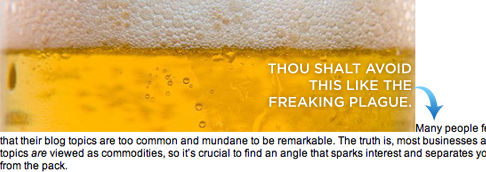
Figure 1. An ugly inline image in Google Reader.You wouldn’t let inline images slip through the cracks like this on your own site, and if you’re anything like me, the feed reader issue drives you nuts. It gets worse, though, because WordPress is not the easiest shrew to tame when it comes to properly formatting posts for display both on your site and in feed readers.
And while WordPress isn’t the only CMS platform out there, the inline image problem extends well beyond the WordPress user base. Therefore, those of you on MovableType, TypePad, Drupal, etc. still ought to be able to glean something positive from this brief tutorial.
When you’re done, you’ll have better looking feeds that are easier to read, and you’ll have the added benefit of actually being able to sleep at night, which I hear is a bonus. Figure 2, shown below, is an example of a nicely-formatted image within a feed reader—notice how the paragraph text picks up under the picture instead of beside it.
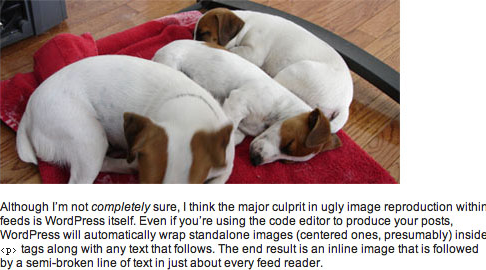
Figure 2. A properly-formatted image in Google Reader.Feed Reader Formatting Options
As you might expect, feed readers do not offer much flexibility when it comes to styling images. Essentially, you’ve either got a nice image like you see in Figure 2 above, or you end up with the hideous beast that I forced you to look at in Figure 1.
You’re probably accustomed to using image-handling CSS classes (like left, right, and center) on your own site, but at this time, the associated styles will not carry over into feed readers1.
You might also be familiar with the align="left" and align="right" attributes, and while those will work inside feed readers, they are considered deprecated in new XHTML specs from the W3C2. Therefore, if I were to teach you this method, it would be the equivalent of me teaching you the ins and outs of a 5600-baud modem—a complete waste of time, and certainly nothing that is going to help you a couple of years down the road.
So, the bottom line is that the most standards-compliant, most consistent result you can hope for in feed readers is going to resemble Figure 2 (regardless of the image-handling class used), and that’s what you’re going to learn here.
WordPress Post Formatting for Display in Feed Readers
Properly formatting your posts so that images display correctly in feed readers is simple, albeit somewhat counter-intuitive. To illustrate, we’ll start with a very basic example—we’d like a center-aligned image, followed by a paragraph of text (just like you see in Figure 2).
For starters, you’ll need to make sure that you’re editing your post inside the normal text editor and not inside the Rich Visual Text Editor. Although WordPress 2.1+ allows you to switch between the two views, I experienced some problems with this, especially when editing a post after it had already been published. I highly recommend that you disable the Rich Visual Text Editor by going to Users → Edit, and then de-selecting the box next to “Use the visual editor when writing.”
Next, all you have to do is ensure that you treat your image reference like a separate paragraph of text, regardless of whether it’s centered, aligned to the right, or aligned to the left. Done correctly, our example WordPress post entry box would end up looking like this:
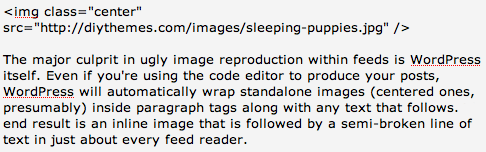
Figure 3. A centered image should be treated as an individual paragraph.Without the single line space between the image reference and the first paragraph of text, you’ll end up with the nearly-pornographic result you saw in Figure 1. Make sure that extra line space is in there before you hit publish, and your post will hit the feed readers in style.
What about left and right-aligned images? To get them to display properly in a feed reader, all you have to do is set up your img reference in a separate paragraph in your post editor, but you also need to make sure that it appears directly before the text that you want it to sit next to. The following example shows exactly how you would structure your post entry box for a right-aligned image:
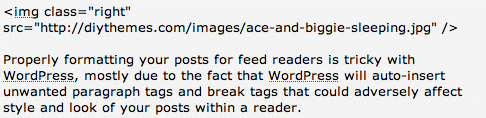
Figure 4. For consistent results, treat left or right aligned images as separate paragraphs.If you’ve done everything correctly, your post will end up looking like this in a feed reader:
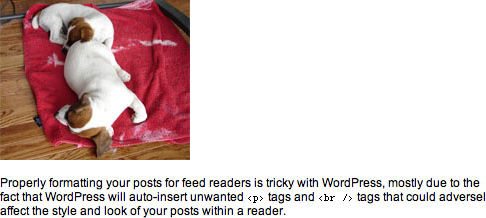
Figure 5. A left or right-aligned image doesn’t float beside the text in Google Reader, but at least it doesn’t break the flow of the text.Although the solutions proposed above are really quite simple in retrospect, they are the only ones I tested where on-site formatting was not compromised. The resulting code is, in my opinion, a little bloated because it contains unnecessary <p> tags, but it still satisfies the following critical requirements:
- No text is broken or displaced in feed readers due to images.
- Visitors to your site will not be able to tell that you’ve done some behind-the-scenes work to ensure that your post displays optimally within a feed reader.
- You don’t have to modify any core WordPress files in order to make this happen—you just have to know how to get the text editor to play nice.
Now go forth, and hook up your RSS subscribers with posts that are a little easier on the eyes!
1 Bloglines is the smartest feed reader that I tested, as it will actually float images left or right depending upon the CSS class used in the img declaration. However, this is the exception, not the rule, so I won’t be addressing this facet of Bloglines directly in this tutorial. Regardless, the techniques described here will work like a charm in Bloglines, so proceed with confidence. ↩
2 Check out the W3C’s XHTML 1.1 img tag specs. ↩
3 And yes, I know my image captions are “broken” in feed readers, but they look so cool on my site. What can I say, I guess a caption tutorial is next on my list.
63 Comments ↓
I knew I wasn’t the only one hacked off at images displaying all over the place in feed readers! Thanks for the tip.
Oh the curse of the obsessive. I knew I had passed into that group when I was obsessing over the odd one pixel of padding that threw one heading out of alignment with another. Like the reader is EVER going to notice. Sigh.
Ah, so simple it hurts.
By the way, Chris, why do YouTube embeds appear on Google Reader fine but not Google Videos?
I embed a lot of videos on my blog and Google video embeds don’t even show on the Reader. I’ve started to include a link to the video for feed readers only, but who has the time to click to open a new link?
The last place I expected Google Videos to not appear is Google Reader. Thanks!
Hi Chris, this is a pet peeve of mine as well. I originally solved it by wrapping my images in <div class="right"> (which is also redundant code I admit) but did the job nicely.
Then WordPress 2.1 comes out and adds an opening <p> after my <div>, but no closing </p>!
And so, I’ve also resorted to using your technique. Cheers.
I’ve also been considering this as well, ever since I’ve adopted the “class” tag instead of the dated “align” - I thank the use of your Cutline theme for that
Thanks for the post - much appreciated!
Thanks much, Chris. This had been on my mind a lot the past couple of weeks. In a few posts I just used divs to make it work out right (or left
), but this is sure more simple.
BTW, I have gotten away completely from using the rich text editor … my first really bad experience with it was with an embedded YouTube video. Then I started paying attention to what it else it was mangling.
Separate subject: looks like you’ve gotten the Subscribe To Comments plugin back up and running (?) … is it now suited for WP 2.2?
Thanks again.
Definitely food for thought there!
I’ve got one of your old designs on my blog at the minute, but would like to design something original myself that is “easy on the eye”, unfortunately I’m a programmer and sometimes my graphic design eye gets left at home in a box!
Thank you. I’ve been experiencing exactly these sort of problems. Now I know what’s causing them.
or you can use HTML (instead of xHTML) and use the otherwise deprecated align attribute. Then again I don’t use WP so perhaps there is no way to circumvent the use of xHTML?
@Matt J: the reader may notice. I notice things like that and I’m a reader of blogs.
thanks for the info on how to edit our rss feeds but how do we edit others?
like:
http://www.thesuperficial.com/index.xml
are there any web tools that will let me do this and give me a new url? etc.
I proposed something a bit different — and more in line with microformat trends and XHTML practices. You might check it out — essentially the idea is to use generic classes like “figure-a”, “figure-b” and so on and then work on a couple levels to get feed readers to add the proper formatting descriptions to their default CSS rendering.
While class=right and so on work to some degree, out of the original context, where layout might not be possible (say, on a cell phone), such classes are meaningless, if not inaccurate. It’s better, therefore, to use something that isn’t presentational but can be reused in new contexts for other purposes.
Bruce — I use WordPress 2.1.3 to run this site, so that’s why the Subscribe to Comments plugin still works. After testing other places and discovering the 2.2 compatibility issue, I decided not to upgrade this site until a new version of the plugin is released.
Dan — In the article, I noted that the HTML elements you mentioned are deprecated in current specs from the W3C (check this footnote for more).
Steve — I’m afraid you can’t edit other people’s RSS feeds. If there are tools that allow you to do this, I’m not aware of them.
Chris — Glad you stopped by, as that was some pretty interesting reading. At this point, I think there is no good solution to this problem that we can point to and say “yes, this is it.”
Regardless, I do think that this is an issue that is best solved by microformats. John Allsopp, whose book I’m currently reading, stopped by your site and mentioned that he wasn’t sure if microformats extended into this particular “structural” realm.
Personally, I think if you look at the idea behind microformats, then yeah, it makes sense that image display should be standardized in a microformat environment. This would greatly assist in areas like image search, and also in identifying and extracting digital media content from Web pages.
I see enough potential benefit to think that a microformat is certainly the “best-fit solution” here. Also, different feed readers would be more likely to adapt to a microformat standard simply because it wouldn’t be a proprietary concept native to one platform.
In the meantime, though, I think feed readers ought to be smart enough to identify classes attached to images. Bloglines does a fair job of this already, and I have a hard time finding something “wrong” with classes like
left,right, andcenter…But like I said earlier, all of these solutions pretty much stink at the moment. Unfortunately, we’re probably still a couple of years away from something that we’ll all look at as an acceptable universal solution.
hmm …
interesting …
thanks …
After skimming it, I sent this article to a friend who was having trouble with this exact problem. It wasn’t until he asked me about it that I realized the ’solution’ proposed here is to move your alignment control to a class (which the feed reader won’t understand) because the reader will mess it up anyway.
Did I read that correctly?
Maybe I’m missing something, but what does the class= left|center|right reference?
Jason — No, try reading the article.
lol… RTFM huh? Guess I deserved that one…
Brian — Those are typical CSS classes that are employed by many popular WordPress themes for handling images. Although use of the
alignattribute is still quite prevalent, it was deprecated years ago in favor of using CSS to control the positioning of images.Thanks Chris. So the theme has to have it defined somewhere in order for it to work….
In typical implementations, is it usually defined specifically for tags, or would it work on other floating elements (e.g. ), etc?
Brian — In my themes, I define these elements specifically for use with
imgtags, but it’s highly likely that if you checked out a bunch of WordPress themes, you’d see many different implementations.Dugg the article & thanks for the replies.
Weird tho, anything that looked like html markup was stripped out my last comment. It was supposed to read “…specifically for img tags…”, and “…(e.g. div class = left )…”.
Thanks Chris, image alignment in my feeds has been driving me batty for a while now and this fix is so easy it won’t take much to fix this problem.
Thanks Chris.
I have the same problem with the Google Reader. I will try to fix it like you said. Thanks!
wwwooooooops! the Subscribe to Comments doesn’t work in 2.2.? After 90% of my sites are upgraded to 2.2 version .. this didn’t even occur to me to test.. // Thanks for heads up. //
Hi Chris,
Interesting issue. I’ve not even been able to show images at all in feeds, but the real reason I’m commenting is to share one of the tidiest feeds I’ve seen. Check out this guy’s feeds especially in Google expanded view. Very beautiful. http://johnplaceonline.com/
Rod — That guy’s feeds look great because he’s using inline styles on his
imgdeclarations to determine a float status and also padding around his images. In theory, anyone could do this and achieve great results. Problem is, inline styles are frowned upon in the development community because we (developers) are working towards complete separation of markup and style (HTML and CSS).Inline styles are a “valid” technique, but no purist would ever let that slide. Plus, using inline styles precludes futureproofing, which is a critical strategy that pays huge dividends as you upgrade and improve your site in the future.
Bloglines isn’t smart
It is the only feed reader, to my knowledge, that totally strips out inline CSS.
Feedburner supports inline CSS
Emails by Feedburner support inline CSS
Google Reader Supports Inline CSS
Bloglines turns inline CSS into a huge mess.
In the end, I have rolled back to using… the deprecated solution (align left / right), and I am going to switch my fomating of footers to use… tables
Ack! Don’t do it Andy! Leave the tables for dining on!
I hadn’t actually heard/read about the concepts that using inline styles were not a “good” thing, however, it does make sense to me after considering it. I use it on all my blogs at our community site. I’ve started to experiment with a dual approach of using both inline styles for the readers to give me at a minimum the alignment, padding, and no borders, while also using my themes style sheet by calling a class specific for the images.
Extra work, yeah. But at the same time, what are you going to do as a site owner/publisher until widespread standards (be they microformats or whatever) are, well, standard!?!
Chris, thanks again for another simple and well explained tip for all us, learn on the go bloggers. Much appreciated.
I totally love your style. Love your dog, your design. You rock… and very good content. Keep up the awesome work.
I am just migrating to Wordpress. org. Thank you for the info.
Wow! I didn’t even know there was a problem with images in a feed. Thanks for the tip.
Chris,
The one thing I HATE about you is that you come out with an awesome blog post and then disappear for a month. I cannot wait a month between your excellent posts.
later,
mrj
this is an excellent tip for me too.
yes- i do pay a lot of attention to how my website and it’s feed looks on different browsers/feed readers but I am still working on making my blog compatible with both firefox and explorer…
and this is another insight.
thanks.
personally- i liked your theme very much…
it looks clean- and very beautiful.
would love to come back again.
Chris,
How do you get Brian’s RSS and mail envelope graphics to bleed over the page margins?
I use your Coppyblogger theme and want to do something similar with my San people pictoglyphs.
See the logo on the righthand sidebar (top) at my site.
Will be grateful for any help you can provide.
Regards
Roberty Bruce
that’s got some great pointers so that anybody that’s new to RSS feeds can get their stuff looking good. and it’s very simple. I’m So excited about it. even bigger sites can learn from this example. I seen a couple of bigger site mess up my feed. I won’t name names though.
Such a relief to discover I am not alone in my misery. I have been misaligned, maligned and resigned to displacement, your suggestion offers me hope of image salvation.
Thank you, Thank you, Thank you…
db
Thanks for the tips!
VERY helpful!
Now . . . can you tell us how to get those lovely captions underneath the photos on our blogs if using Word Press??
Chris, great designs/sensibilities, love the visual pop in this blog’s design.
I have this tagged at delish for future ref and I will use it, thanks for helping the digitally challenged like me.
Hey what is your opinion of using http://www. or not, you may have posted about already and am a fat lazy walrus who hasn’t checked, but still agonizing over this one….I see you use it, but what do you think about just http.
Please help before i need more botox
I’ve created a page on the microformats wiki to discuss this concept further:
http://microformats.org/wiki/figure-examples
Cheers!
Thanks, this was driving me (a little more) nuts
For your information, WordPress users can use Feed Styler plugin to style blog feed.
Your article on Win $5,000 Playing Facebook’s Premier NFL Football Application have not the required space in your feed.
Paul — You are absolutely correct, but I actually had to do that to get the image to appear correctly on this site.
In my article, the image declaration appears before the actual text of the article. Whenever this is the case, additional vertical spacing is provided above the image if I properly format my image for feed readers.
I am somewhat obsessive compulsive, and admittedly, I can’t deal with this extra spacing on my layout. It’s not “perfect,” and that drives me nuts. In cases like this, then, I end up biting the bullet and blowing the format for feed readers.
This is a problem that shows up on other sites as well, but the vertical spacing incurred on my layout is more obvious and unsightly than most.
Chris, What a timely post! I was jsut trying to set up my feedburner feed for my new blog (linked above). I want to use feedburner like all the cool kids to track stats. Using the cutline theme, I can’t quite figure out where to insert the code, aside from just sticking the actual URL into the PHP code for the header file. Is there a better way to do it, like in the rss.php, rss2.php or feeds.php files?
Thanks for a great blog!
I was writing a post this morning and was getting frustrated by the alignment of the pictures, both in my own wordpress blog, as well as the feedreaders. Unfortunately, I’m not good enough with the code to use your solution (the basic class tag in your example didn’t work for me), so I came up with a workaround that seems to be effective.
I wrote my post in microsoft word 2007, and created a 1×1 table for each picture. So the flow went: text, table w/ picture, text, table w/ picture, etc.
The finished product looks good in my blog and in my google reader. I’d love to hear your input, and to offer this idea to less tech-savvy bloggers!
Thanks for the info, Liew! I didn’t know that, so this is definitely helpful since a couple of my sites run on Wordpress.
I don’t think that using inline styles or attributes is an issue at all really. Honestly I am more concerned about the people that use my site than some random person that might look at my source code someday. As long as you’re not using inline styling for every aspect of your site there should really be no noticeable issues with load times or search engine optimization.
I have always wondered how I could get images to display in my feed. Thank you for the tip
I consider that this type of css and html codes are too excessive. A proper xhtml page would degrade nicely on a feed reader. Most feed readers have their own default styles that are applied to HTML elements to provide a nice and consistent look.
Stick to it…
I am so disgusted with what you call ugly my god you must think that you are so attractive to have tohe GALL to make your own value judgemeents on people. I could not beleive that you whom I think are an American, would think that you are so georgeouse as to make your disgusting judgements on others of most photos that I saw where candid trusting photos. I as one whom you probabaly think that I am uglier than thow, I find it so disturbing that you can make these comments on people at their most vunerable, you must be so vain, does it matter what one presents on the outer surface at times when most vunnerable, I can see beauty in most of your photos and I don’t think that I am qualified to make any opinion re uglliness or beauty, Everyone that I look at has beauty of some description, I am sorry I just found your opionions offensive to me as one who is not so beautiful to your standards, but I am sure to my familiy I am not so offensive. Please excuse me if I seem to infringe on your Fifth amendment I think thats is it as we here in Australia do not have a bill of rights to fall back on as do you in the land of the FREE. Again I apologise for infringing on any of you rights but I just think that statements such as yours on that site may cut a lot deeper than maybe you intended, and as I said as one of who has felt the sharp knife of the beauty police thought I must say something, please don’t hesitate to put me straight if I am wrong. I think your site is wonderful and without stumble I may never have found you, Bravo Stumble Upon. Best wishes and love to you and yours Stuart Leamer Winchelsea Vic Australia
OMG…I have actually been doing the right thing COMPLETELY BY ACCIDENT!!!
I must go lie down now…
thanks for the tip. I’ll be including some album artwork in some posts so the article will come in handy.
This was an amazing tip, Now I will mind from future to follow it in my blog posts.
thank you so much for hte tip - I have a second question which has to do with images, I use your cutline and I’ve been trying to add additional header images and now I have six showing at once - can you tell me what I am missing?
help if you can!
I’ve tried to find hte answer over at the cutline site - but honestly htey suck with out you!
At a glance, the issue might sound as a simple HTML trick but I’m sure only few bloggers out there would have rectified it in the right way.
Very good post! Cheers!
Dear Chris,
I have attempted to use this tip within Wordpress 2.3, using your NeoClassical theme, and it didn’t work at all. That is, instead of getting the image on the blog, I got the url instead. Then Wordpress Codex has quite different instructions, starting with changing the style sheet. Can you help, please? I really would like to avoid the ugly inline photos I now have.
Thank you.
DSS — I think that perhaps you have misunderstood the purpose of this particular article. The instructions described here should not affect how the image appears on your actual site; instead, this is merely a way to ensure that feed readers don’t end up spitting out ugly inline pictures.
With the Neoclassical theme, you can apply CSS classes to images to enhance the way they are displayed on your actual blog. I haven’t yet posted on the image handling classes of the theme, but you can use the styles from the Copyblogger theme as a guide.
[...] Format Images for Feed Readers: Chris Pearson has a detailed post explaining how to avoid messing your images inside feed readers. [...]
There’s nothing worse than looking back at a feed to find out most readers churn out loads of gobbledygook, and text around images is a toughy for newbies who struggle with this stuff like I did for oh so long. By the time I figured it out properly for myself, my feedburning software (freeware) 28 day license had expired.
Worse still, I’m “allegedly” a programmer!!!
Go figure!
Bit side question but how did you do that “attention” box?
H.
Never mind. I got it figured out (atleast one way of doing that)…
I used custom.css to format a box like that.
H.
Hoot and/or Holler ↓