If you’ve followed my advice over the last few years, then you already know how to use WordPress categories effectively.
But now that you’re using categories in a meaningful way, do you know how to get your category pages to rank well and dominate in the search engines?
Using this tip that I’m going to share with you today, you’ll be able to do just that.
However, before we begin, I need to let you in on a little secret—by default, WordPress does not provide you with the controls necessary to create category pages that have maximum SEO juice.
Fortunately, this is where I come in :D
Add a Unique Headline and Content to Your WordPress Category Pages
Here’s the trick: All you need to do to get your category pages to slay in the search engines is to add a unique headline and some unique content.
Jaw-droppingly simple? Yep.
Possible with a default installation of WordPress? Nope.
But it is possible with the Thesis Website Framework, which adds these essential SEO controls to “edit category” pages in the WordPress interface:
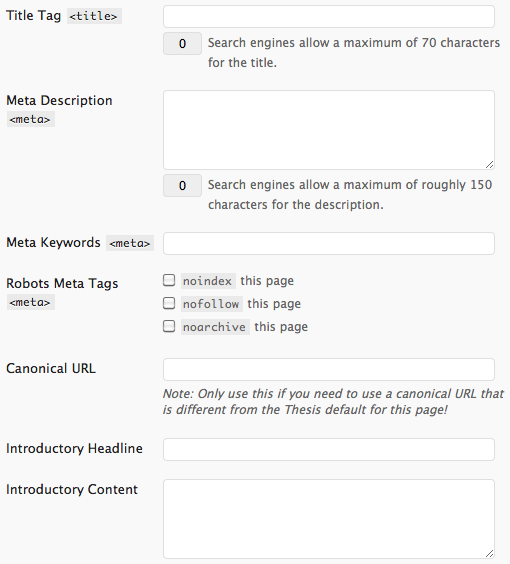
See the Introductory Headline and Introductory Content fields in the image above?
By adding unique content to those fields on each of your category pages, you will make your WordPress category pages rank better in search engines.
How Sugarrae Uses Thesis to Build Category Pages that Rank
Without a doubt, my favorite example of someone who uses Thesis category controls to rank like crazy is Sugarrae.
Check out her affiliate marketing category page, which consistently ranks in the top 10 for the hyper-competitive term “affiliate marketing.”
See the introductory content before the list of posts? It ain’t just sexy, folks—it is essential for getting the maximum SEO benefit from your category pages, and Thesis makes it all possible.
With Thesis, you can take your site to new heights by employing the same strategies as professionals like Sugarrae.
If you’ve never checked it out before, then now is the perfect time to see how Thesis will improve your site.
174 comments… read them below or add one
Good stuff I need to implement this suggestion like as in STAT!
Thanks Pfied
For sure, Krugster. It’s 2006 all over again—I post, and you comment :D
If only all SEO techniques were so easy to implement =)
In my edit category screen I actually see that set of input fields twice. (Not including the canonical URL field) Any idea what could cause that?
Brandi, I sure do—you haven’t upgraded to Thesis 1.8.1 yet :D
Hey thanks! That did the trick and everything loads super fast now too! I usually get the memos about the latest releases but somehow must have missed that one. Woops! Anyway, thanks again.
FYI, I subscribed to the comments on this post but wasn’t notified of your reply or the other comments. Just thought I’d mention it in case you were unaware of the issue.
Fantastic—I’m glad everything is running well!
Thanks for the heads-up on the subscribe to comments behavior. I’ve contacted the plugin developer and will try to get that resolved as soon as possible.
In a friends admin area I saw “Marketers Delight” under Thesis options, but its not in mine. Any idea why it’s like that?
Troy, you should check out your friend’s admin section again.
My guess is that you were looking at a WordPress plugin, since there is nothing called “Marketer’s Delight” that is associated with Thesis.
Chris
Now you’re talking about versions….why is this site on 1.7 ?
Cheers!
hh
Happy Hotelier, there are some minor things I’d have to tweak to bring this site up to 1.8.x. In addition, my custom functions file drives me nuts, and it’ll take me about 2 hours to reorganize it properly.
Instead of dealing with this, I’ve just decided to wait until Thesis 2 is ready before making any changes.
awesome :D will do that over the weekend :D
Thanks for the tips
Are meta keywords still counted? I thought the title only was counted and meta keywords and description not counted. Sounds like its the Introductory headline and content that are counted as well as the title but not the meta keywords and description. Am i right?
Brad, meta keywords are basically worthless at this point. As far as SEO is concerned, the
<title>,<h1>, and the content are the most important elements on the page.You can add the other stuff if you want (I recommend adding a meta description), but the elements I mentioned above are crucial to every page of your site.
What if I use Wordpress plugin like all in one SEO pack? I’m only asking because I never liked using thesis and it would hurt to have to do use it now ;)
Because I don’t use it, I don’t know everything about the All-in-One SEO Plugin, but I do know that these 2 things are true:
Finally, if the All-in-One SEO Plugin contains controls for a unique headline and unique content on category pages, I’d be very surprised.
Thesis was the first theme or plugin to offer these controls.
I’ve been using All in one SEO plugin for a while now. So, if I deactivate that plugin and decide to use SEO controls of thesis instead, will my cutomizations like titles etc will go ?
my changes didn’t take effect .. may be because I have a different setting in all in one SEO ?
Dinu, by default, Thesis does not convert your data from All-in-One. Follow these directions to convert your All-in-One SEO data to Thesis.
Also, if you have no clue how to run stuff in your database, you can use this plugin.
Once you’ve transported the data to Thesis, you can delete the plugin as there’s no need for it going forward.
Hi Chris,
SEO Title Tag plugin also let’s you set title tags for the Category pages as well however I don’t think it will let you add unique content other than the Title Tag. Just an FYI.
I’m not sure if I’m not getting something right but I’ve been using “All in one SEO” for a while now and it allows to change title, description, tag, category for each individual pages/posts. I guess thesis is better?
Fredo, your plugin does not allow you to add unique headlines or unique content to category/tag/taxonomy pages. Thesis does everything you mentioned and adds the crucial controls explained in this post.
In my opinion, yes, it’s better :D
Thanks for sharing this – to be honest it never crossed my mind that one should optimize even the categories.
Tnx
When used properly, categories can be some of the strongest and most important pages of your site. In the right hands, they are an authoritative way to channel link juice and traffic throughout your site.
Hey Chris,
Here’s a question I’ve been posting all over the place trying to get answered…please reply! On my new optimized Category Pages I want to have thumbnails at the bottom alongside the posts. The other Thesis thumbnail controls only seem to work on the regular blog page…not the category pages. What to do?
Also…FYI…at the advice of Sugarrae I now have Wordpress SEO by Yoast installed so as to strip the “category” out of the URL. Other than that need, I would prefer not to use any SEO plugin…hopefully you can include this is the next release.
Thanks, Sharon
Sharon, your thumbnail images are not displaying on category pages because of their positioning. To fix this, visit Design Options → Post Images and Thumbnails → Default Thumbnail Settings, and change your Vertical Position to either before or after headline (instead of before post/page content).
Thanks for the tip on the plugin, too—I’ll see if I can work that functionality into the next version of Thesis!
Thanks Chris…but…its shows as a full-size image and not a thumbnail size. This was the problem I noticed before. Any clues?
When you upload a thumbnail image, make sure it’s the size you want, and then enter the URL of the image in the Post Image and Thumbnail → Thumbnail Image URL field.
This will ensure that the picture is the size you want.
Sorry…still didn’t work. I uploaded the image at 50%, created a new file URL, put that in the Thumbnail box on the post-edit page….and now it does not appear at all. Before, when I was able to see a full size image, I had put the file URL in the post box (on the same post edit page). I’ve spent hours trying to figure this out…and my coding consultant spent an hour on it too…even turned on thumbnails by inserting into custom_functions.php : add_theme_support( ‘post-thumbnails’ )…and it still didn’t work.
Help!! Thanks, Sharon
Sharon, I’m afraid I’ve done everything I can do here, but I’m still confident that we can solve your problem.
Please visit the DIYthemes forums and create a post detailing your problem, and one of our awesome support reps will assist you.
Thanks Chris…gotter done! Girlie fixed me up at the forum.
For anyone else who is reading this and wants to now “how”….the thumbnail image is only associated with teasers…not excerpts. There are other coding options for getting the thumbnails into the excerpts, but for me it was simple enough to switch to teasers. Cheers!
Chris,
How would I be able to do this for a site with a theme other than thesis? Surely someone created a Wordpress plugin to take advantage of this aspect. Cheers on the well-written article.
-Brendan
Brendan, I’m not aware of any plugins that provide this functionality.
Also, why not use Thesis? $87 is within any reasonable website budget, and if it’s not, then I’d recommend walking away from that gig :D
Unfortunately, I already bought another theme… this was a few years ago. I never intended on buying or upgrading to another one since I felt mine was decent enough. I looked at thesis but wanted a different style.
I’m looking back thinking I should have done just so, but perhaps I’ll consider it for the future for now… Thanks for your response!
Chris will you support me if i Will purchase Thesis Developer Option, Basically am not good in customizing themes, But after hearing about thesis, would love to purchase, but i need a proper guidance from basic to advance.
Ragunath, my company, DIYthemes, provides support to all customers who purchase Thesis.
I’ve been a Thesis owner/user for years and it never ceases to amaze me how every time I go “Googling” for an answer to a question I have ~ the how and why, please ~ and I get links to either your posts or Sugarrae. I should anchor my home page here during development and really save some time.
Thanks again for the tips and techniques, Chris. Glad to know Thesis is still the one!
Very cool, Mitch! Thanks for stoppin’ by ;)
This sounds a great functionality that can really help give your Wordpress site that edge over the other umpteen million on the web. Hoping to make the switch over to Thesis for one of our sites very soon.
Hi Chris, My wife’s been toying around with socrates and getting ready to buy that since we can use it on all our sites for the one price. With Thesis, is it limited to one site? sorry to sound uneducated on this one but I am definitely not well versed in the themes. My own site right now is still in its infancy but I do NOT like the theme on it now. Not monetized yet since we are just getting the content built. Sorry for sounding naive about this stuff.
What you’re saying about the categories makes a ton of sense though, and I am pretty sure my wife said that the potential for ranking for categories is NOT part of socrates. We’re just going to be running affiliate links and adsense for the most part.
Thanks for any insight,
John
John, if you purchase a Developer’s Option for Thesis, you can deploy the theme on as many sites that you own as you like.
From my perspective, you’ll be better off with Thesis because of its superior SEO controls and unmatched flexibility.
Unlike other themes, Thesis can adapt to your site’s changing needs over time, so it’s a perfect choice for your site now…and in the future!
Whoa… That was ONE quick response Chris! Thanks! since you’re obviously online now and I’m still here – one more quick newbie question. Do we need to come up wiht our own logos (? headers images?) or does Thesis have a bank or collection of ones we can choose from (that is, various themes)? Finally, will you get credit if we go through your link? Kathy (my wife) is on your site a lot so it would be nice to do something for you since obviously you do so much for her learning. Thanks again for your help. I’ll hand it over to Kath after this I think before I dig myself in too deep here!
John, Thesis does not contain a graphics package or stock images that you can choose from when designing your site.
And there’s no need to purchase Thesis through my link—I created the software, so I get credit every time someone purchases it :D
Ha ha! I didn’t realize that. Told you I was new! (“John… step away from the keyboard now…”)
Thanks again Chris!
Chris i decided to purchase Thesis very soon, what am thinking is, how can i use it efficiently? i don’t have a knowledge in Thesis customization, how can you help me for SEO settings, if you gonna help me to customize the blog for SEO means , with confident am gonna purchase. and tell me, what about the affiliate commission for the thesis framework?
Ragunath, we have professional Support Forums and an exhaustive User’s Guide that you can use to learn about Thesis and customize your site.
As far as SEO is concerned, Thesis is set up optimally out of the box. The idea is that you can run Thesis and not have to think about customizing your site for SEO.
Finally, we have an affiliate program, and you can sign up for that once you’ve become a customer.
In order for this tip to have almost any impact on SEO, each category page needs to include original static content written around the category topic. Otherwise, it can do more harm than good. Also, for many sites, it’s actually better to exclude category pages from being indexed.
During the Go2meeting Sugarrae said to have no more than 40 categories and I have 92….will deleting some hurt my rank?
I have over 100 categories over all my sites and have never felt a serp drop because of it.
Jan, that’s just like saying you’ve smoked a pack a day every day for 20 years but don’t have cancer yet…
LMAO :)
Chris, how do I contact you directly with a question? Email?
Jon, this is the place for questions. Fire away.
Chris, I am still confused about using categories or tags for my website. I am starting a financial website and will write about 100-140 companies. Should I use tags for the companies or categories ?
I personally feel that categories carry more weight in google than tags, but I am not sure.
Thanks in advance.
Michel, if you’re going to be writing about each company only one time, I would recommend not using any categories. If you go this route, use the following URL structure:
If you plan on writing more than one post about each company, then I think it’s ok to use categories for this specific site.
Why do I denounce categories in the article and then say they’re ok here? Because as a rule, people misuse categories and only need about 1/10th of what they’re using now.
In this case, you’re trying to plan a niche site from scratch, and at a glance, it would appear that your content begets such use of categories.
Hi Chris,
I purchased Thesis last summer, I started with personal license, and upgraded to developer few months ago. I so love Thesis, especially hooks, which are life savers. The question I have for you, and I would like to respond on it, is how did you make “new in this issue, still fresh, microwaveable”? Can you please give me code example?
Thanks in advance,
Stefan
Hi Chris, after reading all your answer it is clear to me how to use tag and catagory. Thanks
Thanks for the article, really clears up a lot of things about categories and Wordpress. I just started a site on WordPress and it’s honestly like learning a new language. I need all the articles like this that I can get!
I’ve been using Thesis for a couple of years now and I certainly recommend it! This is the first time I’ve implemented SEO for categories. Whether or not I have them set up the most effectively I don’t know. But I’m curious to see if anything changes with this new SEO in place.
I’m frustrated! I see where to add the SEO for a new category, but cannot find how to update the categories that already exist! I click on “categories” and then on the category itself, and all I can do is change the slug or title. There is a description box, but it does nothing. What am I missing?
Tiffany, based on your comment, I’m assuming that you’ve upgraded to WordPress 3.2. If that’s the case, you should upgrade to Thesis 1.8.2, and you’ll be able to see the appropriate fields on your edit category pages.
Great Post Chris…Thanks for sharing
Really great stuff! Thanks for these wordpress tips!
I never knew wp category could have effect on SEO. Thanks for the guide. I need to start learning more now
WOW! Excellent ideas and tips there. Just going to log into my self hosted WordPress and tweak one or two things.
Really it is great stuff. Before this post i have never knew that word press category could effect SEO page. Thanks for awesome tips.
This works. When I first noticed the option to add content to the category page on a few of my thesis blogs I jumped on it. And had pretty much immediately received sitelinks because of this strategy.
Another thing I did was install the plugin WP Category No Base so it removed the annoying /category/ from the categories urls.
Great stuff Chris.
Thanks for the killer feedback, Bradley.
Amen to removing the
/categorybase from the category URLs—I’m going to add that functionality into Thesis 2.Chris will i get one Free theme With Framework? you have mentioned if we purchase single license for one designed, then we can Upgrade into Developer framework right? am expecting to get one Developer Framework with one already customized theme
Ragunath, your expectations are not in line with our product offerings. Please read this page to see what you get with the Personal Option or Developer’s Option.
Also, if you purchase the Personal Option, you can upgrade to the Developer’s Option at any time.
If you wish to deploy Thesis on sites for clients, then you’ll need to purchase the Developer’s Option for yourself and a Client Site Option for each client.
How are Introductory Headline and Introductory Content handled in a case of a category (with 100s of posts) whose archives are paginated? Would these fields only appear on Page 1 of the archive? I ask this not as a current Thesis user, but someone who is considering it for a redesign. Thanks for the help.
Daniel, the content is only shown on the first page of the archives. All subsequent pages are noindexed/nofollowed.
Frankly, I don’t recommend paginating archives unless you have over 100 links per page. And if that’s the case, then how useful is that particular archive?
ok, that was simple enough…
Hi Chris, I have been using thesis for over a year now and as everyone else, loved it at first and then fell in love. I barely ever needed to go to forums or seek help else where as I have 12 programmers in my team. However, I saw this article and did everything myself last night, upgraded thesis from 1.7 to 1.8.2, then I edited the categories and went to sleep at 3 A.M. thinking “give it a few weeks and my SEO optimized Thesis Blog will knock my competition off their track – like you said.
But then this morning – I went to forum for the first time, only to find a thread about this question which was answered, I guess by your colleague and read
“Re: Categories SEO Details
The Introductory headline and content are not really SEO-related aside from being visible text on the category URI (the “page” of the category). It’s basically a headline + text that appear at the top on the given category “page” – so sort of like a small post – one that shows right before your category loop meaning before the posts assigned to that category are shown. ”
This is in your Forum >> Official Support >> Configuration >> Categories SEO Details
Please clarify and Thank you in Advance!
Sanjeev, the post you read in our forums is inaccurate. The truth is that everything in your HTML is SEO-related to some degree.
In the case of the introductory headline and content on category pages, there is an extremely high SEO value for two reasons:
<h1>tags, making it the second most important element on the page (after the<title>tag).The bottom line is that adding a unique headline and unique content to your category pages will absolutely help their SEO.
I thought so Chris, just wanted to hear from the Horses mouth itself so to speak – and thank you as always for greatest product & support when it comes to WP Blogging :)
Using 1.8 on several of my sites.
Works like a charm :)
Great Tip. My website uses wordpress but SEO seems to be really hard for me for some reason. So anything to give me the edge is good.
I often get asked by friends and clients about how to get their blogs to rank better, and the Thesis framework seems like it’ll be very helpful to them.
I’ll have to do some more research on Thesis, though. I want to see just what kind of stuff can be done with Thesis templates, so I’ll check out some of the users listed on the DIYthemes site.
Thanks for the tip!
Hi there,
I used to think that web design as difficult.But then I learnt alot and its now easy.The hardest problem am faced with is Search engine optimisation. I wish they was a simple solution.
Your article does shed some light.So thanks
Chris,
I hear so much about Thesis, the more I read articles like this the more I realize this is something I really need to check out and perhaps use on some of my blogs.
hello chris, you have an awesome website and design skills. Would it be ok if I implement a -header nav- like yours on my website by looking at your codes? I would feel so happy if you can give me an answer. I don’t want to infringe anyone’s rights. I just loved the header nav on your site.
Mura, you can use the technique for the nav menu, but please don’t use my graphics.
chris, thank you so much. I will try to create my own by taking yours as an example and will definitely say that it is taken from your brilliant site and modified. keep up the good work!
Hi. I’m interested in buying Thesis. Is there any advantage to the buyer if he buys now before the latest version 2.0 is released? Does a buyer pay for every upgrade/new version of the software? Or is it lifetime access to future releases? I’m thinking of getting the single-use version first and upgrade later. I wanted to contact you via the Thesis website but couldn’t find a contact page.
Website Owner, if you buy Thesis now, you’ll be in the best possible position for the future.
Under the current terms, if you purchase Thesis, you’ll get free upgrades for life (which means you won’t have to pay when a new version comes out).
We are planning on changing that once the next version comes out, so if you buy now, you’ll be guaranteed free upgrades for life.
I bought it. Got into a bit of a problem but it came through. So far I like it a lot. And I’m glad I got it in time for free lifetime upgrades. I hope to see an easy way to add tabbed widgets in the future. Also does it have sub-menus? I didn’t see any. I wish I’d saved my money and hadn’t gotten ThemeFrame.
And thanks, Chris. Great job!
Cool Article thanks.
We are in the process of updating our website fairly soon and migrating it to a wordpress platform so this post has been very helpful.
Awesome tip!
Works on Blogger platform as well with some hacks. Not so elegant as in WordPress but does the trick. I only did it for two tags (Blogger’s equivalent for categories).
I’m curious if I’ll see more traffic to those articles.
Thanks!
Chris, I’ve been playing with Thesis on one of my blogs. I like it a lot. But I was hoping I could do a drag-and-drop way of designing my blog, so I can move widgets, resize the header, margins, etc. easily. Is this going to be available in the next version? I love the SEO stuff but since I’m not a professional designer, I need something to help me design with ease.
Website Owner, you’ll be able to drag and drop the elements of your site with the next version of Thesis.
Nice info, I think want to try it to my blog. I’m a newbie, so I need all informationabout SEO that can improve my blog rank,. So again thank you for the tips,. :D
Nice post, will try it out on our WP blog
Did this on a another blog of mine – it totally works. Just another reason to rock Thesis. (Like I needed any more!)
I reverted back to Thesis recently after experimenting with another theme.
I had no idea about the SEO tweaks within categories until I visited here last night.
As a result, I’ve now got my important categories more optimised.
Great work!
First off, stumbled across you blog yesterday and loving it! But I was all pumped up for this post only to find that its basically a Thesis play. I was pumped because one of my categories has been ranking pretty well (page 2-3 in Google) for an insane keyword and I’ve been wanting to improve that page. But I’m a big Woo Themes fan. I have a Thesis developers license for clients and other stuff though.
Any tips for how to do this via code on other themes?
Miguel, if you’re hell-bent on trying to do this with other themes, then you’re going to have to modify the code in your category.php page.
To gain flexibility on a per-category basis (like Thesis), you’d need to insert your own PHP to output a specific headline and specific content for each category that you’d like to “beef up” for SEO.
For most people, this solution is out of reach. By contrast, Thesis’ category input fields make this task ridiculously easy, and that’s important when you consider the impact this has on your SEO.
Great post.
I added a couple of blogs to wordpress about 5 months ago. Now I have got into writing posts on a regular basis, I now want to give my thoughts the best chance of being found.
Thank you for a very simple guide.
Simon
Colchester
This tool seems really useful, I’ll definitely try it. I’ve thought about adding a category header since a while and this will make it far easier. Thanks
I manage the technical stuff for my friend’s sports blog, MDProSports.com, but from the very beginning I kinda let him do his own thing and set it up the way he wanted. He’s a journalism student at UMD so writing quality content was always his top priority. He didn’t (and still doesn’t) care about traffic but I think if he organized his site a little better, he’d see a huge boost in traffic and would find the whole blogging process a little enjoyable.
He writes about 3 different teams for 3 different sports (baltimore ravens, baltimore orioles, and washington capitals) and despite having hundreds of high quality articles, he’s never really had a ridiculous amount of traffic.
What’s your opinion on making the homepage a feature only page, and then making the category pages the main pages for content. I don’t even know what I’m trying to say, honestly. I haven’t slept in a while lol.
Should general keyword backlinks point towards category pages, the homepage, or the actual posts themselves?
Appreciate it.
Drew
Hi Chris, after reading all your answers I’ve been trying to add a category header and this will make it much easier!
Thanks for sharing
Good article…I hadn’t thought about many of these details. I love that Thesis makes SEO a cinch by integrating features like this. Thanks for the heads-up!
Great site + blog and tips in post, however suspect in Google largely going to come down to the links to blog and post more than anything else.
Great post – thank you. I’ve now got the idea to change over my blog theme so I can do this.
“Possible with a default installation of WordPress? Nope.”
That should be the tagline for Thesis. The other day I was searching through the WP plugins to see if there was anything new and exciting that I might be interested in, and I kept seeing plugins where I thought, “Why would anyone need that?” After a few seconds it would dawn on me, “Oh, the people who don’t use Thesis.”
Keep up the good work!
really helps a lot on seo
Hi Chris, I know you are against plugins handling SEO stuff…
Now my question is, I have to do a major update of no-index, no-follow and no-archive on my website of circa 150 pages, the SEO Ultimate plugin would allow me to update all that info under one page listing all pages and I can simply click on the no-index, no-follow and no-archive columns for each page, versus going into each page edit and do it in the Thesis option. Is there a faster way to do this under Thesis?
Also, can I install the SEO Ultimate plugin or will it block the Thesis SEO?
Many thanks.
Thanks for the great tip! We love the idea and are going to be adding this to our category pages ASAP.
Thank you for the post. Very important thing is your WP – website security, because of one mistake, one malware and your PR is going to 0 unfortunately . Good plugin for this is Login Lock-down and wp-security scan. SEO all in ONE is standard but you can try with other plugins like Platinum SEO Pack.
Good advice. SEO is absolutely crucial these days.
Thanks for sharing. This is the kind of info Guru charge on their membership sites.
I have purchased Thesis and cannot get it set up. I don’t where your “Professional Support” is — all I can find is a less-than-helpful forum. You have no live support, no email contact, no phone contact. This is service? Please advise how to: 1. Get help from a human; or 2. Get a refund.
Cathy, we have 3 full-time support reps in our forums who are available to assist you. If they were always “less-than-helpful,” I’d be out of business (and since I’m still in business, I know they are pretty darn helpful).
If you post in our forums, you will get help from a human. It may not be instant (queries are generally answered in 2 hours or less), but you will get the help you need.
Thanks for your patience.
Interesting tip! I’ve only rarely seen traffic to my Category pages, guess I’ll have to check out this Thesis theme. Seems like it’s super configurable.
Sounds Good, i am gonna apply these tips on my blog. may it will help me to increase my ranking on search engine, or may help me to get more backlinks of my blog.
thanks :)
Chris,
Will this work with wordpress blogs that have a number of posts?
Regards
Simon
Simon, this is a great idea for any WordPress blog, no matter how large.
Thanks for the great tip, going to make these changes right now.
Thanks for sharing this awesome tip…..
Wordpress is a fantastic venue for blogging. We actually have an SEO blog through them, this will be an interesting tactic to employ.
Great article.
How can this be done if a theme already does not support/have this?
Any tip/plugin?
Chris,
I like what I see in Thesis. Do you think you’ll be making more videos?
Planning on buying soon, just want to see all the tools under the hood.
For me, a picture is worth a thousand words.
Thanks
Roger, we’re going to be rolling out a slew of new stuff for Thesis over the next few months. Sign up for the email list here and at DIYthemes, and you’ll be able to stay up-to-date with the forthcoming awesomeness.
I was looking almost 2-3 weeks and reading reviews about thesis and with every review or article i’m more impressed and really thinking about thesis. I’m sure that i will buy developer licence soon.
Thank you Chris for sharing informations :)
thank you , i want to know if there is any conflict between All in One SEO Pack plugin and SEO Ultimate ?!
thank you for the tip
Chris,
I appreciate all your updates..questions..If I change my theme to Thesis will I loose all my previous drafts/posts. And I’m a newbie so there’s a lot of terms I don’t get..is it easy to get a support?Please look at my website and critique it as I have so many glitches in there,especially the menu on the left upper hand side by the header. That’s as far as I got and can’t seem to fix it anymore. Can’t afford a web designer yet!! Thanks in a million.
Nida, Thesis does not affect your posts (or drafts).
Based on the way your site appears right now, I think you could really benefit from the simple design, optimization, and orderly nature of Thesis. We have 3 full-time support experts who can help you get your site up to speed, too, so you won’t be left out in the cold.
Ok Chris ..you got me! I will avail of it as soon as I get the chance to work with my site again! Thanks for your quick response.
first time here from Diythemes email,does the site is brother with Diythemes.com?
Ben, I own this site, and I also founded diythemes.com, so yes—they’re brothers :D
I wish there were a way to deal wtih categoris and tags for a blog with over 1,000 posts. I don’t want to go back and re-do all of them. I’d like another option. Has anyone heard of something that would use your current tags and set them up as SEO for old posts?
Laura, properly organizing the data on your site is one of the most important things you can do. Indeed, from an SEO standpoint, nothing is more critical to your site’s success.
Unfortunately, fine-tuning your content in this manner is a manual process—no program can make these organizational decisions for you. I highly recommend limiting the number of categories on your site to less than 10. In fact, 5 or less would be optimal.
Also, unless you really know what you’re doing and have an explicit SEO plan, I would remove tags altogether.
Im kinda new to the whole wordpress thing….a few years slower than the normal curve lol but this article really helped me out. I wish there was just one module for all, without having to install lots of modules for lots of small things….oh well that’s the internet for you. Thanks again!
Regarding your reference to Sugarrae: “See the introductory content before the list of posts?” Uh, no. Am I not looking in the right place?
Dave, are you looking at this page? If so, the list of posts starts beneath the video. Everything above that is introductory content that will help this page rank in search engines.
Ah. I thought you were talking about the list of categories — Administrative, Affiliate Marketing, etc. I guess my problem is that I don’t know what a “category page” is, or how it’s defined. Back to SEO kindergarten for me …
To get online search traffic on site SEO is very important. Thanks for this valuable tips.
Thanks for the tip – already tried it out on one of our newer Wordpress sites – will see how it works out!
Category SEO? Whoa! That’s cool. I never heard of SEOing categories. Thank anyways
Regarding your reference to Sugarrae: “See the introductory content before the list of posts?” Uh, no. Am I not looking in the right place?
This is really very helpful information, at first glance I thought it is just to give the proper name but doing SEO with cat, helped a lot to get index pages…thanks for sharing valuable tips
Thanks for sharing these valuable tips.. , really helpful
I’m using Genesis, does it still work, but can not be compared with all in one seo pack.
How do you get the images that are normally displayed on your posts to show up on the category view as well using thesis?
Hey Chris,
Thanks for all the neat info and the offer of Thesis. I desire to purchase but don’t know if Yola web builder will be able to use it. I don’t even know if they use wordpress at all. I am a little green at this but all your answers and comments have really lead me to believe you know your stuff.
We also have a highwire store that I would like to use thesis on. It will be full of images, which many I would like to rank in google image search.
If I need to trash these web builder sites and start over with something that uses wordpress, well I might just do that.
Thanks, Tony
Thanks for this. I am loving WordPress the more I get to know it.
Hey Chris,
Thanks for the article. Great feature within thesis.
good. this will be a big help to us. :) thank you for the reference. we are using this application in doing our websites for our clients. Furthermore, as a web development company, SEO is very important for us. thanks again. :)
Thanks for sharing these valuable tips.. , really helpful
Bingo this was what I was searching for. I’ll definitely use it for my blogs seo. Thanks a lot. Great info.
Thank you for the great tips. I have been using a few SEO tips and these strategies do work! Thanks for sharing!
@Chris I’ve a question regarding individual post meta description instead of having individual post meta description sometimes google is no picking it up rather than its showing from post first paragraph like it usually does. I’ve seen this problem many other blogs i don’t know why but its happening….
Hi Chris,
You have provided good source of information for all who are out there trying to provide better ranking for websites. Providing customised title and proper description no doubtley helps website climb various search engine ladders.
The thesis theme is great and very flexible. Is there any information you would have for non thesis theme ?
woooow this very simple
Hi Chris…
I just found your site this morning when I did a search for “how to set up categories for your blog.” I have to say that you give such great and useful information – your knowledge and willingness to share it is so wonderful.
I have a long way to go before my blog really does what I want it to do – and I am in the midst of re-categorizing. I switched my blog from Blogger over to Wordpress.org over the summer – and from Blogger, I was left with an amazing amount of categories that I thought helped me…but my blog designer just told me to really pare it down. I am a little frightened of whittling it down for fear that it will lessen my SEO – but my designer said that the “tags” I assign each post will help with SEO. So – are tags the things that Google looks for? Should I limit my categories to about 10? And then include the words that I have noticed that people use to find my blogposts as tags? And should I switch/add all the tags first and then re-categorize.
{ I apologize for my beginner questions}
I also installed All in One SEO that does what you listed above. I installed the Plugin and it shows up – and I have been using it. However, I haven’t configured it yet (it’s asking me to do this!). But I looked at what it wants me to do – and I froze! I have no idea how to do this. My web designer says she doesn’t do Plugins (the only thing she did was add Google Analytics). Can you help me with this?
Thanks,
Linda
PS – I am going to sign up to get your updates!
I really like the header in one of WordPress themes. I’ve received numerous compliments on it. I assume that is entirely unavailable if I change to Thesis, right? Does DIYthemes.com offer candidate headers?
Thanks for all the info on this blog!
Garth
Great article im going to implement this on my new web design site.
Thanks, I have a website built on thesis, but i have so many categories. is there any option to fetch meta tag of parent category?
Great advice, hopefully this will be a big help to us. Just like many other businesses, SEO is very important for us. I hope our website does better with this advice.
please some one tell me which framework is batter for SEO ..genesis or thesis
Thesis is the industry leader when it comes to SEO.
Sweet! Gotta try Thesis now and the steps outlined in this post.
Chris, I’m an inventor and engineer with a gift for out of the box thinking and problem solving. I just purchased Thesis 2.0 for one of my product launches in the pet industry. I want to discuss a website innovation with you that could revolutionize how we look at website and the fun part is that most of the tools exist to implement it, so its a great opportunity to consider. All I need to share it is a private means to discuss via email, chat, or phone and 1 minute of your time. I included my Linked-in profile above. I can communicate and even demonstrate my original, empowering concept/technology very quickly so please call ASAP — I don’t want this idea to sit dormant any longer.
“you learn something new everyday”
This is certainly the case for today thanks to this post. Thank you!
I have to say, I know quite a bit about SEO so when I can actually take a few gold nuggets away from someone elses article, it is always a plus. I love the fact that everything is so easy to implement.
I am definately going to bookmark your page and when my customers purchase my wordpress amazon store theme, I will most definately be including your link in a welcome email and send them on over, if that’s ok with you. They will learn alot from reading your posts.
Thanks again for some awesome information.
Thanks for lovely article. I just want to know that it is good to give noindex attribute to Category and Tags or I should change it? Please reply me. I’ totally confused….
Thanks, for great information. Actually I want to insert a very useful table on category pages. So how i can insert html code in introductory content table..Thanks
Great post. Will definitely be trying this out to see if it’s better than the current plugins I use.
Very interesting post indeed, I knew about using meta description and title on categories but never knew about the Introductory Headline and Introductory Content, as I understand these are only available with the Thesis Website Framework?
Denisa, that’s correct. Thesis is the first framework to offer comprehensive content controls in the name of better information flow and SEO.
Combine this with killer KW research and you’ll be onto a winner.
There’s one phrase I live by… ‘long tail’. I like to target highly optimised individual posts for long tail keywords, get some link juice to them and watch the traffic drip in.
After that point I just keep my fingers crossed that my writing is good enough to keep people there (debatable) and clicking through.
Well I’m just a beginner and don’t know much like some of you there.. but whatever i know all i can say is I loved the post.
Chris You have some really great writing capability, obv you know that !
Just one thing Great Job.
Regarding the post .. Would try this ! :)
Cheers !